The usual cause of WooCommerce failed order spam is automated card testing, not one difficult customer. Bots push stolen card numbers through your checkout in small amounts to see which still work, and each attempt becomes a failed order.
I once watched a client’s orders screen fill with 70 failed payments in under an hour, every one for $0.87. Nothing was broken. Someone was testing stolen cards against his checkout, and his gateway may have been quietly charging him for the privilege.
That distinction matters, because the fix for a bot is not the fix for a person. This guide covers how to tell which one you have, what the pile-up actually costs you, and what stops each.
The Short Answer
Check whether the failed orders share a name or email. If they don’t, and they’re arriving in bursts of small amounts across many different cards, you’re being used as a card-testing ground. The answer there is a CAPTCHA and rate limiting at the checkout, not a block list.
If the same name or email keeps appearing across days or weeks, that’s a person, and a block list ends it in about a minute.
Both problems produce the same symptom. Only one of them has someone to name.
What A Failed Order Actually Is
A failed order is a checkout that reached your store, created an order record, and then didn’t complete payment. WooCommerce keeps the record so you can see what happened, which is useful when a real customer’s card is declined and less useful when a script is running a thousand attempts.
Bots generate them because your checkout is a free validity checker. A stolen card number is worth very little until someone confirms it still works, and a small purchase on a real store is the cheapest way to confirm it. The amount stays low on purpose, since a $0.87 charge is less likely to trigger a review than a $400 one.
That’s why the volume tends to arrive as a burst rather than a trickle. A script isn’t pacing itself.
The Two Causes, And How To Tell Them Apart
Look at the billing details across the failed orders. That single check settles it.
Card testing looks like: many attempts in a short window, different card numbers, small and similar amounts, names and emails that don’t repeat or look machine-generated, and often no matching customer account.
A named offender looks like: the same name or email recurring over a longer period, normal-looking order values, and usually a history you recognise: someone who has ordered before, or who you’ve had a dispute with.
What we’ve seen: store owners tend to assume the worst-case version, which is an attack, and reach for the heaviest tool available. Just as often it’s the opposite problem in disguise: a handful of failures spread over three weeks, same email each time, which is one person rather than a script. Reading the billing details before choosing a tool saves buying the wrong one.
| Factor | Card testing (automated) | Named repeat offender |
|---|---|---|
| Signature | Many tiny orders, mixed cards, minutes apart | Same name or email recurring over weeks |
| Is there a name to block? | No | Yes |
| What stops it | CAPTCHA, rate limiting, gateway rules | A block list entry |
| Does a block list help? | No | Yes |
What A Failed-Order Wave Actually Costs
The orders failed, so it feels like nothing was lost. Four things usually were.
Gateway costs on declined attempts. Depending on your processor and plan, authorisation attempts and declines can carry a cost even when no payment completes. On those plans, a few hundred attempts can turn a non-event into a line on your statement.
Processor attention. A sudden spike in declines is exactly the pattern payment providers watch for. The risk isn’t the fee, it’s a review of your account at a moment you’d rather not be interesting.
Real orders buried. When your orders screen is 90% junk, the genuine failed payment from a customer whose card expired gets missed. That one was recoverable with an email, and now it isn’t.
Your time. Someone has to look at all of it and decide what’s real.
None of that shows up as a refund or a chargeback, which is why it goes unmeasured. It’s still money.
If It Is Card Testing: What Actually Stops It
A block list cannot help here, and it’s worth being direct about that rather than selling you something that won’t work. There’s no name to add, because the details are different every time.
What works is making the checkout expensive to hammer:
- A CAPTCHA on the checkout. Raises the cost of automated attempts enough that most scripts move on.
- Rate limiting. Cap how many attempts a single session or address can make in a window. This is the single most effective control against a script.
- Gateway-side rules. Many processors offer settings to limit repeated failed attempts against the same order or from the same source. Check yours and turn that on before you install anything.
Our guide on how to stop spam orders in WooCommerce covers those layers properly, and the wider picture on WooCommerce anti-fraud explains where automated detection fits against manual controls. If your failed orders are a script, start there and don’t buy a block list.
Where A Block List Helps
If the same details keep appearing, you have a person, and this is the case a block list is built for.
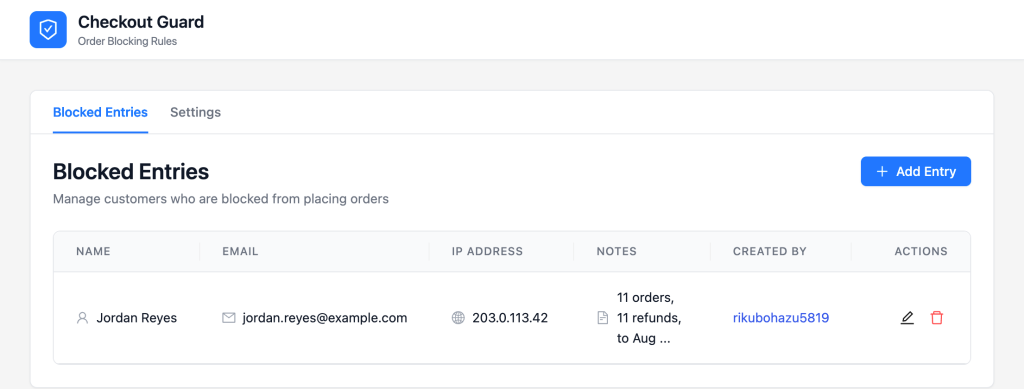
Checkout Guard, our WooCommerce block list plugin, matches on a billing email or a full name. The match is exact and case-insensitive, so nobody who isn’t on your list is affected. Add the email off one of the failed orders, and that person’s next attempt stops.
The part that matters for cost is where the block happens. Checkout Guard denies the order at checkout validation, before payment is attempted, so the gateway never sees it. You’re not paying a gateway to decline someone you already decided to refuse, and your orders screen stays clean.
To be clear about the boundary: this is a slice of the failed-order problem, not all of it. If you have both a script and a person, you need rate limiting for one and a list for the other. Our guide on preventing fake orders and the explainer on what a WooCommerce block list plugin does cover how the two fit together.
Frequently Asked Questions
Why do I suddenly have dozens of failed orders?
Almost always because a script found your checkout and is testing stolen card numbers against it. The tell is many attempts in a short window with small, similar amounts and no repeating customer details. It isn’t a sign your store is broken.
Do failed orders actually cost me money?
They can. Depending on your processor, declined authorisation attempts may carry a cost, and a spike in declines can attract a review of your merchant account. The less obvious cost is the genuine failed payment you miss because it’s buried in the noise.
Will a block list stop card testing?
No, and any tool claiming otherwise is overselling. A block list matches details you added by hand, and card testing supplies different details every time. Rate limiting and a CAPTCHA are the controls for that.
What is card testing?
Someone with a batch of stolen card numbers using a real store’s checkout to find out which are still active. Small amounts keep the attempts below the threshold that would attract attention, and your store gets used as the verification service.
Should I delete the failed orders?
Keep them until you’ve read the pattern, since the billing details are the evidence that tells you which problem you have. After that, clearing them is a judgement call. Some owners keep a month for reference.
Does Checkout Guard help with failed orders?
For the named-offender slice, yes: it stops that person before payment is attempted, so the gateway never processes a charge. For automated card testing it doesn’t help, because there’s no consistent name or email to block.
Read The Pattern Before You Buy A Tool
The reason failed-order spam gets solved badly is that both causes look identical on the orders screen, and the more alarming explanation is the one people act on. Ten minutes reading billing details tells you which tool you actually need.
Here’s what to do next:
- The Two Causes, And How To Tell Them Apart: check whether a name or email repeats
- What A Failed-Order Wave Actually Costs: work out what the pile-up is costing you
- If It Is Card Testing: What Actually Stops It: add a CAPTCHA and rate limiting first
- Where A Block List Helps: block the person, if there is one
If the failed orders trace back to someone you can name, Checkout Guard stops them before payment is attempted.