WooCommerce refund abuse is rarely spread thinly across your customer base. It concentrates in a handful of people who have worked out that your returns policy is generous and your attention is finite, and it keeps going until somebody notices the pattern.
A store owner once sent me a spreadsheet of one customer’s history: eleven orders, eleven refunds, about £1,400 gone. He’d been treating each one as an isolated service problem, because from inside a single conversation that’s exactly what it looks like.
This guide covers what the patterns look like, how to find them in your own order data, where generosity stops being good service, and how to stop the worst offenders.
The Short Answer
Identify the pattern first, then block the person. Export your orders, look at refund rate per customer rather than per order, and the repeat offenders separate themselves from the ordinary returns immediately.
Once you can name someone, add their billing email or full name to a block list and they can’t place another order. Tightening your returns policy for everyone is the tempting alternative, and it taxes every honest customer to deal with two dishonest ones.
What WooCommerce Refund Abuse Looks Like
Refund abuse is a customer using your returns process to get goods without paying, repeatedly and on purpose. It sits apart from a genuine return, and apart from a chargeback, because the money goes back through your own checkout rather than through a bank dispute.
The behaviour is common enough to be measured. According to NRF, 9% of all returns are fraudulent, and 19.3% of online sales were expected to be returned in 2025 against total returns of $849.9 billion. So the baseline is that roughly one in eleven returns isn’t legitimate.
| Pattern | What it looks like | What to do |
|---|---|---|
| Wardrobing | Ordered, worn or used, returned as new | Policy first, block on repeat |
| Serial “damaged on arrival” | Every order from this person arrives broken | Block once the pattern is clear |
| Empty-box return | Return received, contents missing | Block immediately |
| Refund-and-reorder | Refund, then reorder at a discount | Block on the name |
None of these is provable from a single instance, which is exactly why they work. Repetition is the evidence.
How To Spot The Pattern In Your Own Orders
The data you need is already in your store, and the trick is looking at it per customer rather than per order. A 6% refund rate across the store tells you nothing. One customer at 100% tells you everything.
Export your orders with the customer and refund fields, then sort by refund count per email address. Store Exporter Deluxe, our WooCommerce export plugin, filters orders by specific customers and by date range, so you can pull a year of history for the handful of names you’re suspicious about rather than trawling the whole table. Our guide on how to block a customer on WooCommerce covers what to do once a name comes out of that list.
What to look at once you have the file:
- Refund rate per email, not per order. Anything near 100% over three or more orders is a pattern.
- Time between order and refund request. Consistently just inside your window is a choice, not a coincidence.
- Reason given. The same reason every time, from the same person, is the strongest single signal.
- Order value. Some abusers stay just under the threshold where you’d inspect a return properly.
What we’ve seen: almost nobody discovers this by looking. They discover it when a support conversation feels familiar and they go back through the history. Running the export once a quarter and sorting by refund rate turns that accident into a routine, and it usually surfaces one or two names the owner half-suspected already.
Where Generosity Stops Being Good Service
A generous returns policy is a real competitive advantage, and it works because the overwhelming majority of customers use it honestly. So the question isn’t whether to be generous. It’s who you’re being generous to.
A rough framework that holds up in practice:
- One refund, any reason: no question. The cost of investigating is higher than the refund, and you’d be wrong most of the time.
- Two, spread out, different products: still fine. People change their minds.
- Three or more from the same person with the same reason: that’s a pattern. At this point the generosity isn’t buying goodwill; it’s funding a habit.
- Any empty-box or swapped-item return: act immediately. That one isn’t ambiguous.
The number matters less than having one. Without a threshold you’ll keep making each decision in isolation, which is how eleven refunds happen to the same person.
Policy Changes Vs Blocking One Person
When a store owner finally notices refund abuse, the first instinct is usually to tighten the policy: shorten the window, demand photos, add a restocking fee.
That approach makes every honest customer pay for two dishonest ones. It can reduce conversion, it generates support work, and the person actually costing you money adapts to it faster than your good customers do.
Blocking one person costs your other customers nothing. It’s a narrower, more precise response to a narrower problem, and it leaves the policy you built for the people who use it properly intact.
Blocking A Serial Refunder
Checkout Guard, our WooCommerce block list plugin, matches on a billing email address, a full name, or both. The match is exact and case-insensitive, so nobody who isn’t on your list is affected.
Add the entry and write a note recording why. Keep it short, something like “11 orders, 11 refunds, to Aug 2026”. Then save. Their next order is denied at the checkout before payment is attempted, so no charge is made.
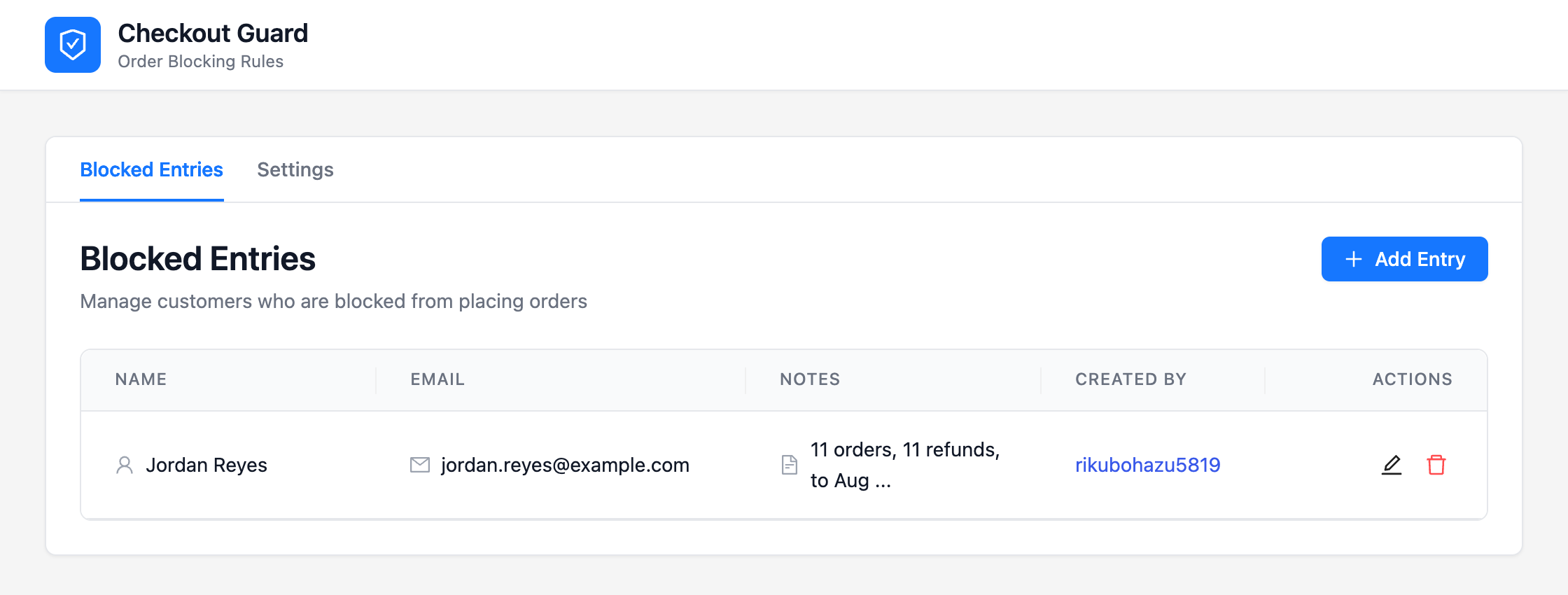
Worth being clear about what the plugin does and doesn’t do: Checkout Guard doesn’t detect refund abuse. It has no view of your refund history and makes no judgement. You identify the pattern, and it enforces the decision you’ve made. The judgement stays yours, which is the correct place for it.
Chargebacks, where the money goes back via the customer’s bank rather than your checkout, are a neighbouring problem, and the WooCommerce anti-fraud overview sets both against automated risk scoring.
Frequently Asked Questions
Is it legal to refuse to sell to a customer?
In general a store can decline business, provided the refusal isn’t based on a protected characteristic. Blocking someone because of a documented pattern of refunds is a commercial decision. If you’re unsure how this applies in your jurisdiction, take local advice.
How many refunds is too many?
There’s no universal number, which is why picking your own matters. Three from the same person with the same reason is where most owners land. The point is deciding in advance rather than case by case.
Should I change my returns policy instead?
Only if the problem is widespread. If it traces to a few names, a policy change penalises everyone who uses your returns honestly while barely inconveniencing the person you’re aiming at.
Can I block someone who keeps requesting refunds?
Yes. Add their billing email or full name to a block list and their next order stops at the checkout.
Won’t they just use a new email address?
Some will. Matching on full name as well as email catches the casual version, and someone who changes every detail every time is a determined case that a manual list won’t fully solve. In practice most don’t bother.
Does refund abuse affect my chargeback ratio?
Not directly, since a refund you process isn’t a chargeback. It matters indirectly: a serial refunder who is eventually refused often escalates to a bank dispute, and that does hit the ratio.
Find The Pattern, Then Act On It
Refund abuse survives on being invisible one order at a time. The fix isn’t vigilance on every transaction. It’s one look at refund rate per customer, which takes an export and ten minutes.
Here’s what to do next:
- What WooCommerce Refund Abuse Looks Like: learn the four patterns worth recognising
- How To Spot The Pattern In Your Own Orders: export orders and sort by refund rate per email
- Where Generosity Stops Being Good Service: pick your threshold before the next case
- Blocking A Serial Refunder: add the name, write the note, move on
Found your one or two? Checkout Guard stops them at the checkout, and Store Exporter Deluxe is how you find them in the first place.