The Store Exporter Deluxe vs WP All Export debate comes up a lot among WooCommerce store owners. Both are popular export plugins. However, they solve the job in different ways. One is built just for WooCommerce. The other is a general WordPress tool that needs a paid add-on for store data. Knowing that difference can save you time and money.
That gap affects the price you pay, the features you get, and how fast you can run your first export. So before you install either plugin, it helps to know what sets them apart.
In this guide, we break down Visser Labs‘ Store Exporter Deluxe vs WP All Export comparison across features, pricing, ease of use, and WooCommerce depth so you can pick the right fit for your store.
Table Of Contents
- What’s the Difference Between Store Exporter Deluxe and WP All Export?
- How Do the Export Features Compare?
- How Does Third-Party Plugin Compatibility Compare?
- What Does Each Plugin Cost?
- How Easy Is Each Plugin to Use?
- How Does Support and Documentation Compare?
- Who Should Choose Which Plugin?
- Frequently Asked Questions
- Final Verdict
What’s The Difference Between Store Exporter Deluxe And WP All Export?
The Store Exporter Deluxe vs WP All Export difference comes down to focus.
Store Exporter Deluxe is a WooCommerce-native plugin. WP All Export is a general WordPress export tool that needs a separate paid add-on for WooCommerce data. That specialist versus generalist split shapes the main differences between the two.
What is Store Exporter Deluxe?
Store Exporter Deluxe is a premium WooCommerce export plugin by Visser Labs. It was built for store data and has served WooCommerce owners since 2013. The free version holds a 4.1-star rating on WordPress.org.
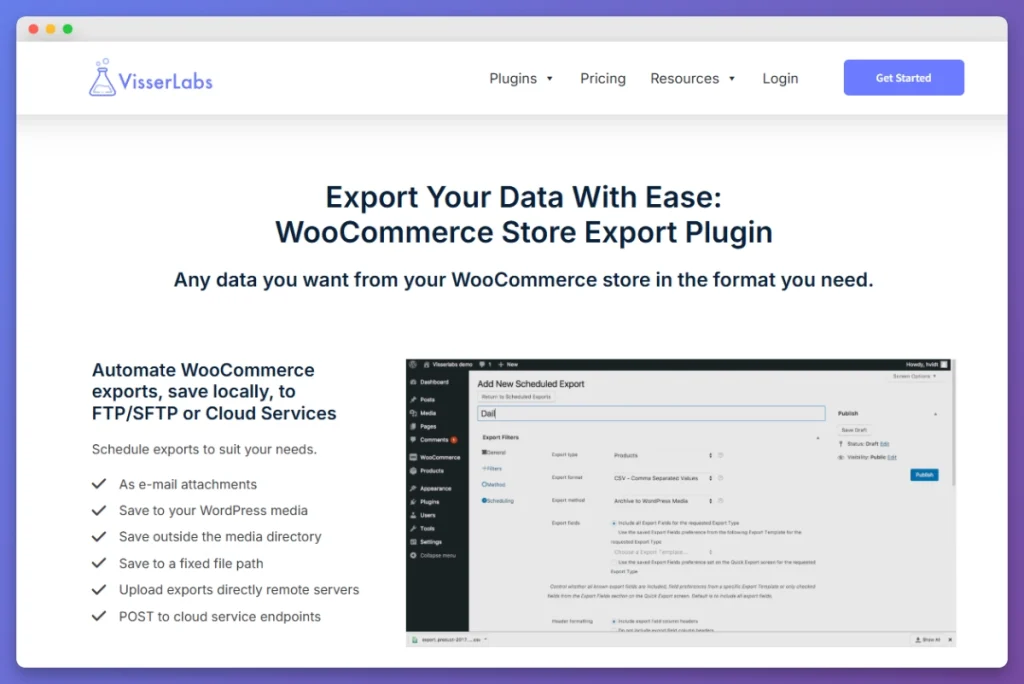
In our testing, Store Exporter Deluxe detected all WooCommerce data types right after activation. Orders, products, customers, subscriptions, bookings, and more appeared on the first screen. No extra add-ons were needed.
In the Store Exporter Deluxe vs WP All Export comparison, this is the specialist side. It knows WooCommerce inside and out.
What is WP All Export?
WP All Export is a general WordPress export plugin by Soflyy. It exports WordPress post types, custom fields, and taxonomies. It has more than 100,000 active installs on WordPress.org.
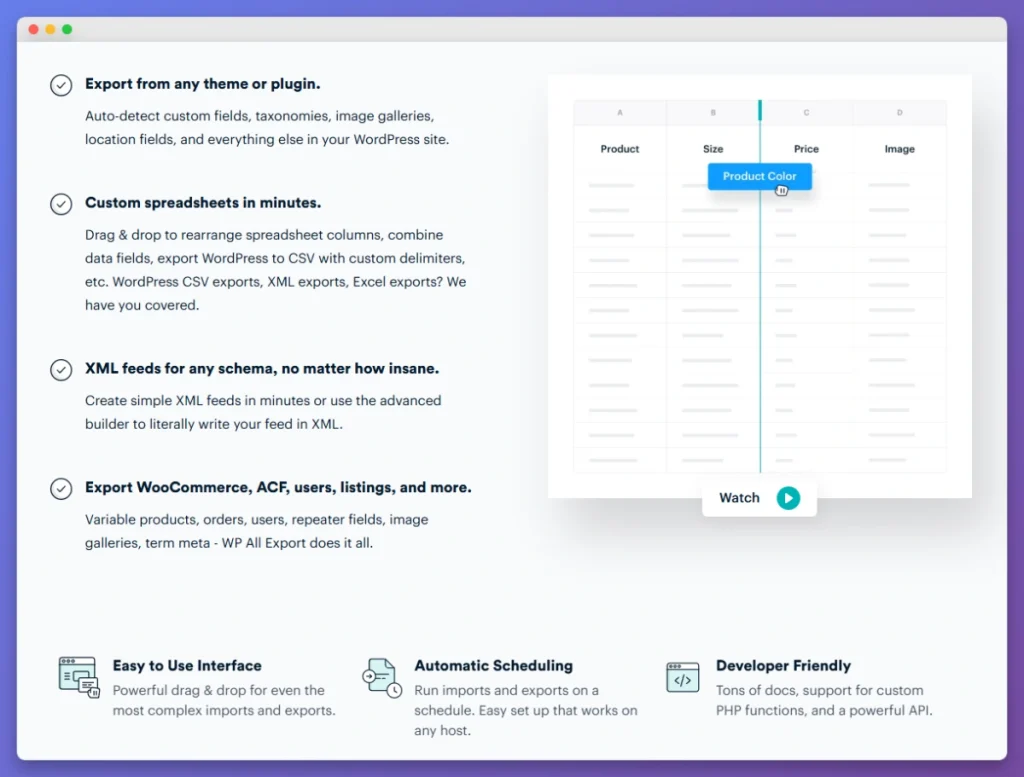
When we activated the base plugin, WooCommerce fields like order line items and subscription data were not there. To get the fields store owners need, you must buy and install the separate WooCommerce Export Add-On.
On the other side of the Store Exporter Deluxe vs WP All Export debate, WP All Export is the generalist. WordPress is its strength. WooCommerce is an added layer.
| Aspect | Store Exporter Deluxe | WP All Export |
|---|---|---|
| Focus | WooCommerce-only | General WordPress, WooCommerce via add-on |
| WooCommerce support | Built-in from activation | Requires separate paid add-on |
| Starting price | $39.50/yr (Exporter only) | $169/yr (WooCommerce Export Package) |
| Free version | Yes (WordPress.org) | Yes (WordPress.org) |
| Drag-and-drop builder | No | Yes |
| Developer | Visser Labs | Soflyy |
How Do The Export Features Compare?
On export features, the Store Exporter Deluxe vs WP All Export gap is one of the first things you notice. Store Exporter Deluxe offers 18+ WooCommerce export types and 7 file formats out of the box. WP All Export covers core types across 3 formats. Special data often needs manual custom field setup.
How many export types does each plugin support?
Store Exporter Deluxe supports 18+ dedicated WooCommerce export types with no add-ons required. WP All Export with its WooCommerce Add-On covers the core types. However, it handles special data through custom field mappings instead of dedicated export types.
Here is how they compare:
| Export Type | Store Exporter Deluxe | WP All Export + Add-On |
|---|---|---|
| Orders | Yes | Yes |
| Products | Yes | Yes |
| Customers | Yes | Yes |
| Coupons | Yes | Yes |
| Subscriptions | Yes | Via custom fields |
| Bookings | Yes | Via custom fields |
| Product variations | Dedicated export | Via product export |
| Shipping classes | Yes | Manual config |
| Categories/Tags | Dedicated export | Via taxonomy export |
| Reviews | Yes | Via comments |
| Brands | Yes | Manual config |
| Commissions | Yes | Not natively |
Which export file formats are available?
Store Exporter Deluxe supports seven formats: CSV, TSV, XLS, XLSX, XML, JSON, and RSS. WP All Export supports just three: CSV, XLSX, and XML.
| Format | Store Exporter Deluxe | WP All Export |
|---|---|---|
| CSV | Yes | Yes |
| TSV | Yes | No |
| XLS (legacy Excel) | Yes | No |
| XLSX (modern Excel) | Yes | Yes |
| XML | Yes | Yes |
| JSON | Yes | No |
| RSS | Yes | No |
CSV and XLSX cover most use cases. But if you need JSON for a custom API or TSV for a legacy system, Store Exporter Deluxe gives you those options without workarounds. According to BuiltWith, WooCommerce’s plugin has been downloaded over 230 million times. That scale creates many export format needs.
How do filtering and custom fields work?
WP All Export has a drag-and-drop column builder. It lets you pick, reorder, and rename export fields visually. In our testing, it made non-standard product exports with renamed columns easy to build.
Store Exporter Deluxe uses filter panels built for each data type. When you export orders, you see order filters like date ranges, statuses, payment methods, and customer types. In our testing, narrowing an export to “completed orders from the last 30 days paid via Stripe” took about three clicks.
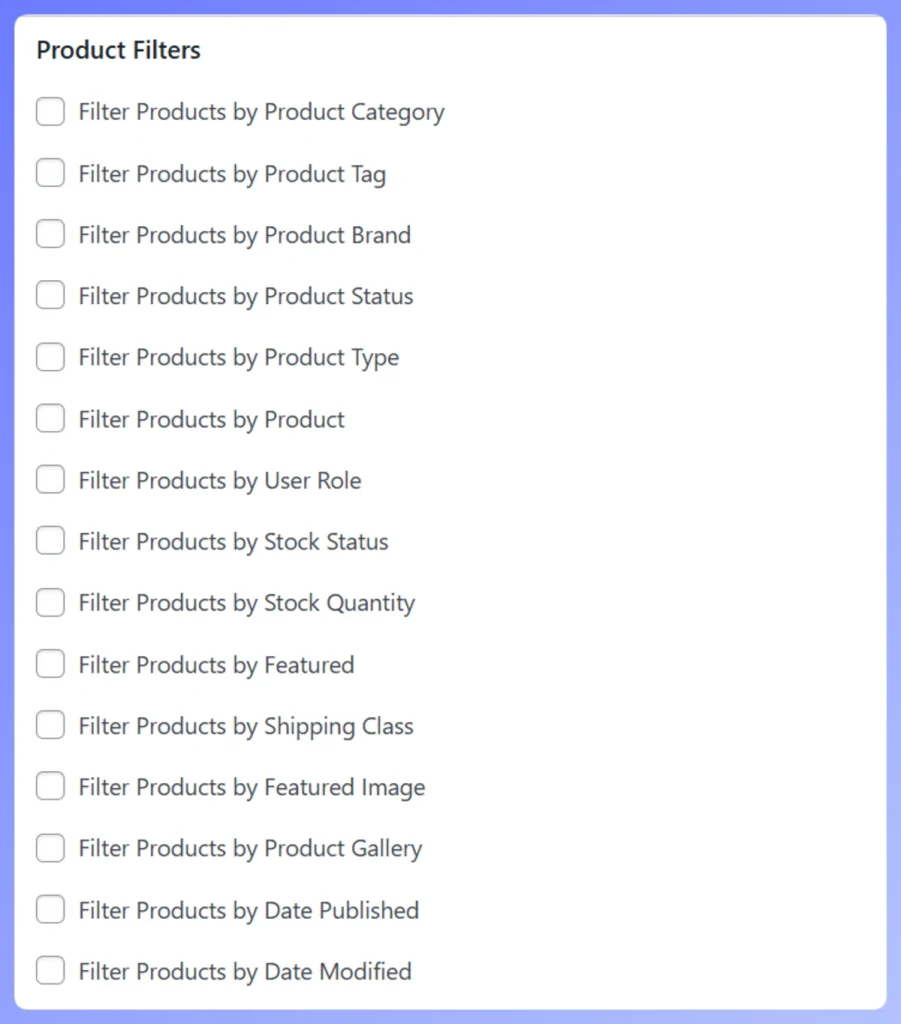
Both approaches work. It comes down to what you value more: visual flexibility with WP All Export, or WooCommerce speed with Store Exporter Deluxe.
How Does Third-Party Plugin Compatibility Compare?
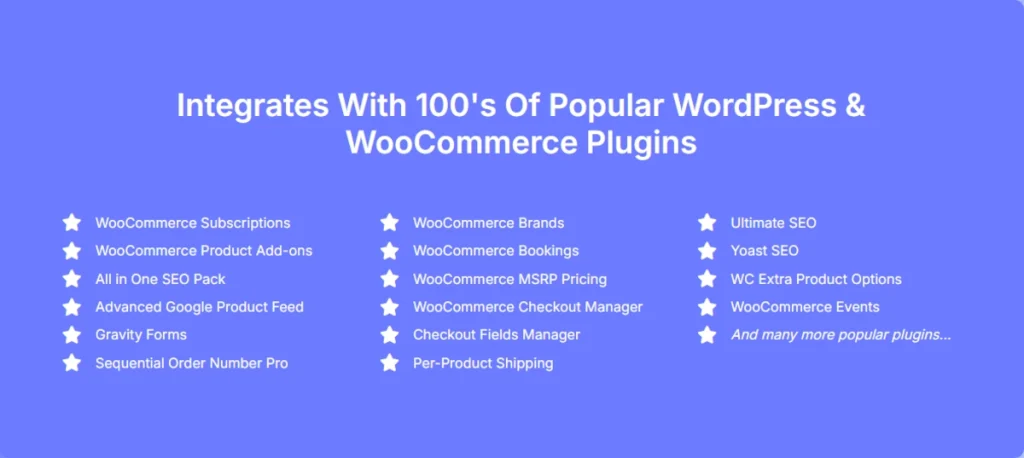
Plugin support is another big area where Store Exporter Deluxe vs WP All Export shows a clear gap. Store Exporter Deluxe works natively with 125+ WooCommerce and WordPress plugins. It finds their data automatically. WP All Export can also reach third-party data, but you have to set up meta keys by hand.
Many stores run extra plugins. You might use WooCommerce Subscriptions for recurring billing, WooCommerce Bookings for appointments, or Advanced Custom Fields for product data.
We tested Store Exporter Deluxe with WooCommerce Subscriptions. It exported fields like next payment date, status, and billing interval with no extra setup. The plugin found the data and formatted it on its own. Fields from ACF and WooCommerce Product Add-Ons also showed up right away.
WP All Export can get this data too. But you need to know the exact meta keys and build the template yourself. It works, yet it takes more WordPress know-how.
What We’ve Seen: Store owners using WooCommerce Subscriptions or Bookings often find out too late that their export plugin cannot handle that data. They run an export and see that renewal dates or booking times are missing. A WooCommerce-native plugin solves this. The fields appear automatically, so there is no last-minute scramble for meta keys.
Do both plugins support scheduled exports?
Yes. Both support cron-based scheduled exports. You can run them hourly, daily, weekly, monthly, or on a custom schedule. Store Exporter Deluxe can save exports to your server, send them by email, or upload them via FTP/SFTP. WP All Export Pro offers similar options, including delivery to a URL or custom script.
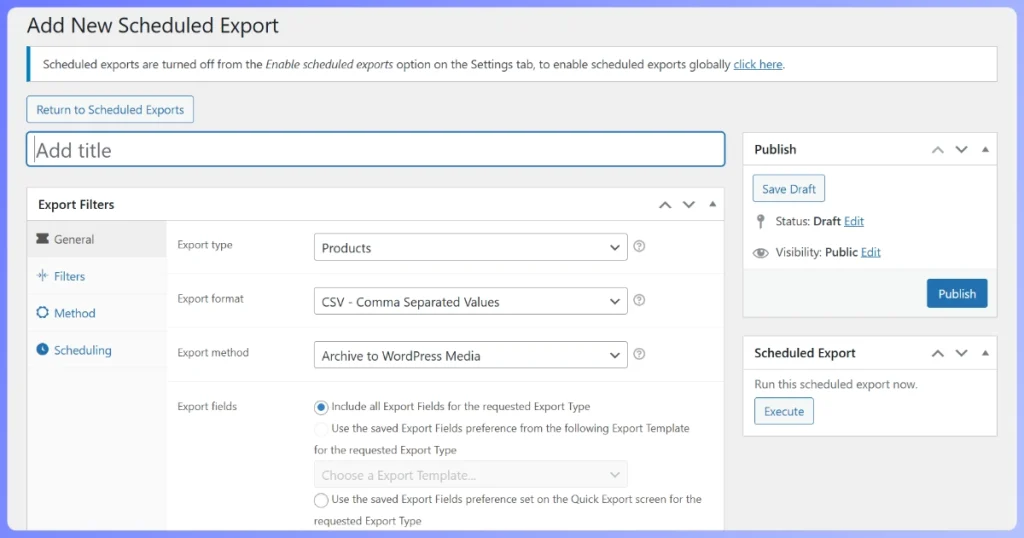
The main difference is how tightly the schedule ties into WooCommerce filters. With Store Exporter Deluxe, you can set up a filtered export, such as “weekly completed orders from Australia,” from one screen.
What Does Each Plugin Cost?
The Store Exporter Deluxe vs WP All Export price gap is large. Store Exporter Deluxe starts at $39.50 per year with all WooCommerce features included. WP All Export’s WooCommerce Export Package costs $169 per year. Over three years, you save over $300 by choosing Store Exporter Deluxe.
How is Store Exporter Deluxe priced?
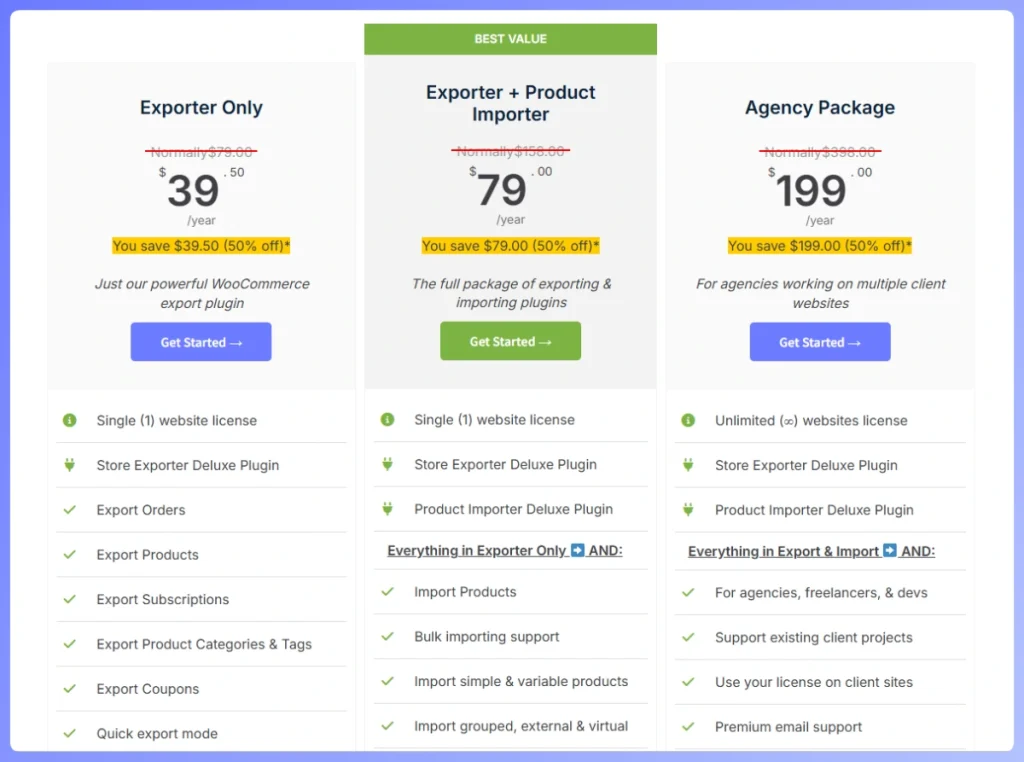
Store Exporter Deluxe uses a simple annual license with three tiers:
- Exporter Only: $39.50/year (intro price, normally $79)
- Exporter + Product Importer: $79/year (intro price, normally $158)
- Agency Package: $199/year (intro price, normally $398, unlimited sites)
Every plan covers the full export feature set: all 18+ export types, all 7 file formats, scheduled exports, 125+ plugin integrations, and priority support. See the full breakdown on the Store Exporter Deluxe pricing page.egrations, and priority support. See the full breakdown on the Store Exporter Deluxe pricing page.
How is WP All Export priced?
WP All Export uses a layered pricing model. For full WooCommerce export support, the most direct option is the WooCommerce Export Package at $169/year. If you also want import features, the Export Pro Package starts at $199/year and the Import + Export Pro Package costs $299/year.
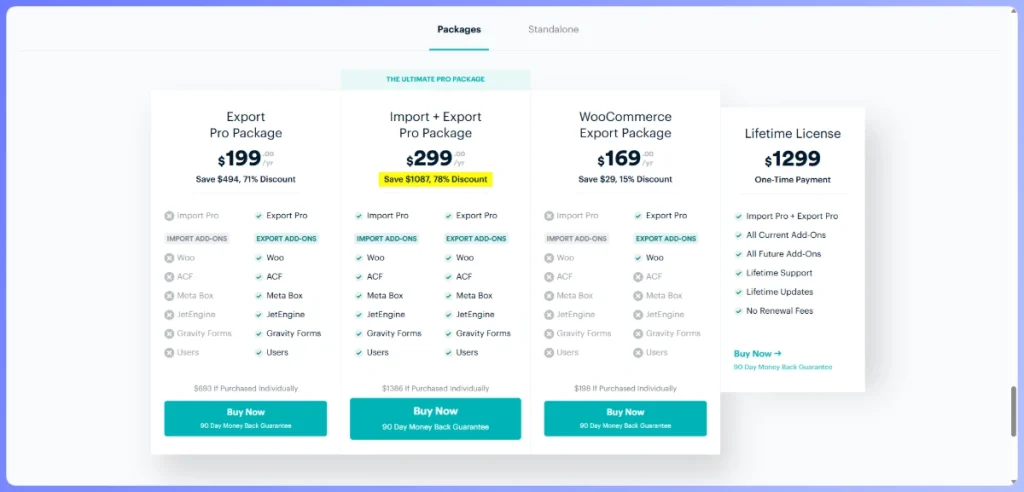
The base standalone Export plan starts at $99/year, but that version does not include the WooCommerce-specific add-ons most store owners need.
What’s the true cost over time?
| Timeframe | Store Exporter Deluxe | WP All Export (WooCommerce Package) | You Save with SED |
|---|---|---|---|
| Year 1 | $39.50 | $169 | $129.50 |
| Year 2 (cumulative) | $118.50 | $338 | $219.50 |
| Year 3 (cumulative) | $197.50 | $507 | $309.50 |
According to BuiltWith, WooCommerce powers millions of online stores worldwide. Many store owners first choose WP All Export for its drag-and-drop builder. Then they switch after the add-on costs rise more than expected.
With Store Exporter Deluxe, every dollar goes toward WooCommerce features. With WP All Export, you also pay for general WordPress export tools you may never use.
How Easy Is Each Plugin To Use?
For ease of use, Store Exporter Deluxe vs WP All Export tips clearly in one direction. Store Exporter Deluxe gets you to a finished export faster. There is no add-on to install and no template to build. WP All Export’s visual builder adds options, but it also adds steps for standard WooCommerce exports.
How quickly can you run your first export?
Store Exporter Deluxe: Upload, activate, and all WooCommerce data types appear right away. In our testing, we went from install to a finished order export in just a few steps. No add-on, no setup wizard, and no API keys.
WP All Export: After activating the base plugin, you install the WooCommerce Add-On. Then you create an export, choose your post type, and build a template. Store Exporter Deluxe had a much simpler path to the first export, which matters if you run exports often.
What does the day-to-day workflow look like?
With Store Exporter Deluxe, a typical order export takes five steps. Go to Store Export, click Orders, pick your fields and filters, click Export, then download. The plugin remembers your last settings, so repeat exports go faster.
With WP All Export, you load or create a template, set filters, run the export, and download the file. The template system is powerful. But it adds steps that many store owners do not need for simple WooCommerce exports.
Still weighing the Store Exporter Deluxe vs WP All Export choice? For a broader look at your options, our roundup of the best WooCommerce export plugins covers more tools, including free alternatives.

How steep is the learning curve?
Store Exporter Deluxe has a gentle learning curve. The interface uses terms WooCommerce store owners already know. The filters are easy to understand. If you know WooCommerce, you will know this plugin.
WP All Export has a moderate learning curve. The drag-and-drop builder is easy once you understand it. But you also need to learn post types, custom field keys, and template logic. For developers, that is normal. For store owners who just want order data, it is another hurdle.
How Does Support And Documentation Compare?
Both plugins offer email support for paid users. In the Store Exporter Deluxe vs WP All Export comparison, the key difference is focus. Visser Labs works only on WooCommerce export tools. Soflyy supports a wider range of products.
Store Exporter Deluxe support comes from the team that builds the plugin. When you contact Visser Labs about an export issue, you talk to people who work on it every day. The free version also has support through WordPress.org forums.
WP All Export offers email support through Soflyy for Pro users. It also has solid documentation at wpallimport.com with step-by-step guides and screenshots. According to StoreLeads, WooCommerce powers about 33% of all online stores globally. Both plugins are actively maintained and updated to keep pace with WooCommerce and WordPress core releases.
Who Should Choose Which Plugin?
In the Store Exporter Deluxe vs WP All Export decision, the right choice depends on your setup. Store Exporter Deluxe is the better fit for WooCommerce-focused store owners who want fast, affordable, and deep exports. WP All Export suits agencies and developers who need general WordPress export tools beyond WooCommerce.
Is Store Exporter Deluxe right for you?
When choosing in the Store Exporter Deluxe vs WP All Export debate, pick Store Exporter Deluxe if your exports are all about WooCommerce data. It is a great fit if you match any of these:
- WooCommerce-only exports, orders, products, customers, subscriptions, and bookings
- Budget-conscious store, $39.50/yr intro vs $169/yr saves a lot over time
- WooCommerce extensions, native support for Subscriptions, Bookings, Brands, and more
- Fastest path to an export, no add-ons, fewer clicks, and quick setup
- WooCommerce-specific support, specialists who work on this every day
Is WP All Export right for you?
Choose WP All Export if your needs go beyond WooCommerce:
- Non-WooCommerce WordPress data, blog posts, custom post types, and mixed content
- Visual drag-and-drop builder, useful if you build non-standard export layouts often
- Already using WP All Import, helpful if you want to stay in the Soflyy ecosystem
- WordPress developer or agency, ideal if you manage many content types across non-WooCommerce sites
For a full walkthrough covering pre-migration audits, parallel-run testing, and a cutover checklist, learn how to migrate from WP All Export step by step.

Quick verdict table
| Scenario | Best Choice | Why |
|---|---|---|
| Small store, WooCommerce-only exports | Store Exporter Deluxe | Lower cost, faster setup, purpose-built |
| Store with Subscriptions/Bookings | Store Exporter Deluxe | Native extension support |
| Agency managing WordPress + WooCommerce | WP All Export | General-purpose flexibility |
| Custom templates with drag-and-drop | WP All Export | Visual builder strength |
| Budget-conscious store owner | Store Exporter Deluxe | $39.50/yr vs $169/yr |
| Heavy WP All Import user | WP All Export | Ecosystem consistency |
If you’re also weighing Store Exporter Deluxe against a plugin focused exclusively on orders, the breakdown looks different. See how the two tools stack up when the comparison is order-only scope vs. full-store coverage: How Store Exporter Deluxe compares to Advanced Order Export for WooCommerce.
Final Verdict: Store Exporter Deluxe Is The Better Choice For WooCommerce Stores
After hands-on testing, the Store Exporter Deluxe vs WP All Export verdict is clear for most WooCommerce store owners. Store Exporter Deluxe wins on price, WooCommerce depth, and ease of use. You get 18+ export types, 7 file formats, and 125+ plugin integrations for $39.50 per year. WP All Export’s WooCommerce Export Package costs $169 per year.
WP All Export is a solid plugin. Its drag-and-drop builder is a real strength for agencies that manage different kinds of WordPress content. If that is your setup, it is worth considering.
But for WooCommerce store owners, the Store Exporter Deluxe vs WP All Export choice is simple. Store Exporter Deluxe is built for your store. It is faster to set up, cheaper to run, and handles WooCommerce data with no extra setup. Over three years, you save over $300. You also get better WooCommerce depth the whole time.
Ready to see it in action? Visit the Store Exporter Deluxe product page to explore the full feature list, or check out the pricing to get started today.
Frequently Asked Questions
Can I use the free versions for WooCommerce exports?
Yes, both plugins have free versions on WordPress.org. Store Exporter for WooCommerce (free) supports basic WooCommerce exports like orders, products, and customers in CSV format. WP All Export’s free version can export WordPress content to CSV and XML, but WooCommerce fields like order line items require the paid add-on. For most store owners, the free version of Store Exporter gives more WooCommerce functionality out of the box.
Do both plugins support WooCommerce HPOS?
One common question in the Store Exporter Deluxe vs WP All Export discussion is HPOS support. WooCommerce is moving to High-Performance Order Storage (HPOS), which changes how order data is stored. Store Exporter Deluxe has been updated to fully support HPOS. Your order exports work correctly no matter which storage method your store uses. Check each plugin’s changelog for the latest status.
Can I switch from WP All Export to Store Exporter Deluxe?
Yes, switching from WP All Export to Store Exporter Deluxe is easy. Both plugins create standard files like CSV, XLSX, and XML. There is no complex migration. Just install Store Exporter Deluxe, set up your export settings, and start using it. Your existing export files remain valid. If you had scheduled exports in WP All Export, you will need to recreate those schedules in Store Exporter Deluxe.
Does Store Exporter Deluxe work on WordPress multisite?
Yes. Each site in a multisite network can have its own export settings and schedules. This is useful for agencies or businesses running multiple WooCommerce stores on one WordPress multisite install.