
If you’ve ever uploaded a product CSV to WooCommerce’s built-in importer and watched it silently fail on half your variable products, you know the feeling. The WooCommerce native product import vs plugin question usually doesn’t surface until that moment — when the free tool works to a point, and your catalogue gets complex enough that no amount of CSV reformatting will fix the walls you keep hitting.
WooCommerce ships with a free, built-in product CSV importer. For a brand-new store with 30 simple products, it’s genuinely fine. According to W3Techs usage data, WooCommerce powers around 8.4% of all websites and roughly 49% of identified ecommerce platforms, which means the importer’s limits are something a lot of store owners eventually run into. For anything more complex than a basic catalogue, you start running into silent failures, missing variations, and mapping issues that eat entire afternoons.
Below is an honest WooCommerce native product import vs plugin comparison, set against Product Importer Deluxe, with seven specific limitations I’ve hit on real store migrations and how a dedicated plugin solves each one.
Table Of Contents
- What The Native WooCommerce Importer Does (And Doesn’t Do)
- 7 Limitations Of The WooCommerce Built-In Importer
- How Product Importer Deluxe Solves Each Limitation
- Side-By-Side Feature Comparison
- When The Native Importer Is Enough
- Frequently Asked Questions
- Native Importer Or Product Importer Deluxe: Choosing Your Tool
What The Native WooCommerce Importer Does (And Doesn’t Do)
WooCommerce includes a product CSV importer accessible under Products, All Products, Import. It’s free, it’s already installed, and it can create or update products from a CSV file.
The native importer’s biggest strength is simplicity. Upload a CSV, map the columns, click Import. For a small store with simple products and no variations, that’s genuinely all you need. There’s no plugin to buy, no licence to manage, no settings tab to configure.
The simplicity becomes a limitation the moment you need anything beyond a one-time import of simple products. There’s no update-only mode, no way to import from an FTP source, and variable product handling that requires your CSV to follow a strict format with minimal feedback when something goes wrong.
Over the next few sections, I’ll frame the WooCommerce native product import vs plugin trade-off through the seven specific limitations I keep running into when store owners use the native importer, and how Product Importer Deluxe by Visser Labs addresses each one.
7 Limitations Of The WooCommerce Built-In Importer
Here are the seven gaps I’ve hit most often with the native tool, in the order they usually surface.
1. No update-only mode
The native importer can create products or update existing ones by matching on SKU or ID, but there’s no dedicated mode that only updates without creating. If your CSV has rows that don’t match any existing product, the importer creates them as new products, which is rarely what you want on a weekly stock update.
Product Importer Deluxe offers three distinct modes. You can import new products only, import new plus update existing, or update existing products only. That last mode is the one most stores need for recurring stock and price refreshes, and it’s the mode the native tool doesn’t have.
2. Variable product nightmares
The native importer handles variable products, but only if your CSV follows a specific structure that’s only lightly covered in the official WooCommerce Product CSV Importer documentation. Variations must appear in rows following their parent product, with particular columns populated in particular ways. Miss a field and the variation imports as a simple product. Mis-order the rows and the parent gets stuck in draft.
I’ve tested this with a 200-row variable product CSV. The native importer failed on roughly 40% of variations, either creating them as flat products or leaving parents without any variations attached. Product Importer Deluxe handled the same CSV without manual adjustment because its variable product detection recognises parent-child relationships through SKU patterns.

If you’ve seen this pattern on your store, Visser Labs has a dedicated troubleshooting resource for WooCommerce product import issues that covers the common failure modes.
3. CSV-only format
The native importer accepts CSV files only. If your supplier exports in TSV (tab-separated values), TXT, or any other delimited format, you need to convert the file before uploading. Product Importer Deluxe accepts CSV, TXT, and TSV natively, which removes one file-shuffling step from every import.
4. Upload-only source
You can only upload files from your computer. There’s no way to pull a CSV from a server path, a URL, or a remote FTP server. For stores that receive supplier feeds, that means a manual download-then-upload loop every time.
Product Importer Deluxe supports four import sources: computer upload, server file path, remote URL, and remote FTP. You can point the plugin at a supplier’s FTP drop folder and pull the latest file without touching your desktop.
5. No streamlined recurring imports
Every native import is a full manual cycle. Navigate to the importer, pick a file, map columns, click Import, wait. There’s no shortcut for stores that re-run the same import every week, which means every recurring refresh starts from scratch.
For stores with daily or weekly supplier feeds, this becomes a time tax. Product Importer Deluxe trims the cycle by pulling files directly from a remote URL or FTP source, so a recurring stock refresh is a single click instead of a download-then-upload loop.
6. No intelligent column detection
The native importer requires you to manually map every CSV column to a WooCommerce field during import. If your CSV’s column headers don’t exactly match WooCommerce’s expected names (and they rarely do), you click through every dropdown on every import.
The first time I used Product Importer Deluxe’s intelligent column detection on a 20-column CSV, it correctly mapped 18 fields automatically. The two it missed were custom meta fields from a third-party plugin, which I mapped manually in about 30 seconds. On a weekly import workflow, that adds up fast.
7. Limited plugin compatibility
The native importer only handles core WooCommerce fields. If your store uses WooCommerce Subscriptions, WPML, YITH Brands, or custom fields from a third-party plugin, that data won’t import. You either write a custom import script or work around the gap.
Product Importer Deluxe advertises native support for 125+ WooCommerce plugins, including WooCommerce Subscriptions, WPML, YITH Brands, Yoast SEO, All-In-One SEO, and Advanced Google Product Feed. That’s the difference between a one-tool import workflow and an import plus custom-script workflow.
What We’ve Seen: The most common frustration we hear from store owners is variable product imports failing silently. The CSV uploads, the progress bar completes, but half the variations are missing or created as simple products. The native importer gives minimal error feedback, which means you often don’t realise something went wrong until a customer tries to select a size or colour that doesn’t exist on the product page. By then the damage is done.
How Product Importer Deluxe Solves Each Limitation
Here’s how each of the seven gaps maps directly to a Product Importer Deluxe feature.
- No update-only mode. Product Importer Deluxe offers three import modes, including a dedicated update-existing-only option for recurring stock and price refreshes.
- Variable product handling. Intelligent parent-child detection based on SKU patterns handles complex variable products without requiring strict CSV row ordering.
- CSV-only format. Product Importer Deluxe accepts CSV, TXT, and TSV files natively.
- Upload-only source. Import from computer upload, server file path, remote URL, or remote FTP.
- No streamlined recurring imports. Remote URL and FTP sources let recurring imports skip the manual download-then-upload step.
- No intelligent column detection. Automatic column detection maps most common WooCommerce fields with a manual override for custom fields.
- Limited plugin compatibility. Native support for 125+ WooCommerce plugins, including Subscriptions, WPML, YITH Brands, and the major SEO plugins.
I tested a common migration scenario on a staging store: import 200 variable products from an FTP folder, then update stock levels on 500 existing simple products on a weekly cadence. With the native importer, the first run took multiple attempts to get variable products right, and every weekly stock refresh needed a manual download-then-upload. With Product Importer Deluxe, the variable product import worked first try, and the weekly refresh became a one-click rerun pulling the latest file straight from FTP.
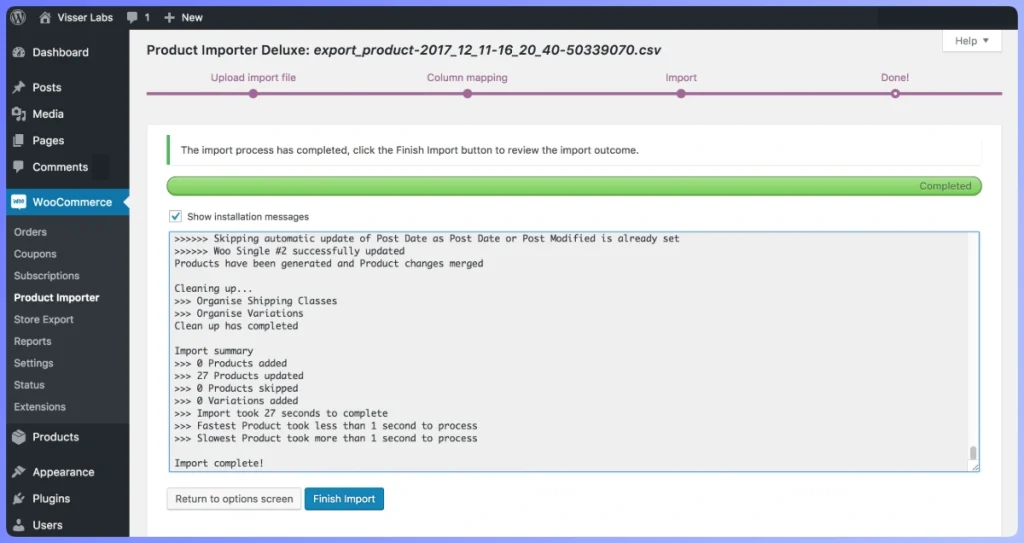
See Product Importer Deluxe in action →
Side-By-Side Feature Comparison
Here’s how the two tools stack up on the capabilities that matter most for real-world WooCommerce import work.
Feature comparison based on each tool’s official documentation as of 2026.
| Capability | WooCommerce Native Importer | Product Importer Deluxe |
|---|---|---|
| Price | Free (included with WooCommerce) | $79/yr bundled with Store Exporter Deluxe (current promotional pricing) |
| Import formats | CSV only | CSV, TXT, TSV |
| Import sources | Upload from computer only | Upload, file path, URL, FTP |
| Import modes | New + update (combined) | New only / new + update / update existing only |
| Variable products | Limited (strict CSV format required) | Full native support with intelligent detection |
| Column detection | Manual mapping | Automatic with manual override |
| Plugin compatibility | Core WooCommerce fields only | 125+ third-party plugins |
| Recurring runs | Full reconfigure each time | One-click rerun from URL or FTP source |
| Product types | Simple, variable (limited) | Simple, variable, grouped, external, virtual, subscription |
| Error reporting | Minimal (silent failures) | Real-time logging |
The native importer’s only real advantage is price and zero installation. Every other row favours a dedicated plugin, and the gaps widen the more complex your store gets.
When The Native Importer Is Enough
Before you buy anything, here’s where the native importer still makes sense. If you fit any of these profiles, save your money.
- One-time imports of 50 or fewer simple products. Classic use case for the native tool. No plugin needed.
- Initial store setup with basic catalogue. Seeding a brand-new store with a simple product list. The native importer is fine for this.
- Stores that never update products via CSV. If your catalogue is stable and you edit products individually in the admin, a CSV importer isn’t a recurring need.
Here’s where the native importer stops being enough:
- You run regular stock or price updates from a supplier CSV.
- Your catalogue includes variable products beyond a handful.
- You pull imports from a URL or remote FTP source.
- Your store uses WooCommerce Subscriptions, WPML, or similar plugins with custom product data.
- You’ve had imports fail silently and lost confidence in the results.
If any of those match your store, a dedicated tool pays for itself on the first major import cycle.
Native Importer Or Product Importer Deluxe: Choosing Your Tool
The WooCommerce native product import vs plugin call comes down to scale and frequency. The native importer has a real place for the stores it was designed for: one-time imports of simple products on a brand-new catalogue. For stores that have outgrown that stage, the native tool’s limitations turn into real costs in time, errors, and support headaches.
Product Importer Deluxe is the natural next step. It’s purpose-built for WooCommerce, handles the complexity the native tool can’t, and at $79/year as a bundle with Store Exporter Deluxe, it typically pays for itself on the first serious import cycle. For broader context on your options, Visser Labs’ complete guide to importing WooCommerce products walks through the main approaches in detail.
Here’s the short version of how to pick:
- Read through the 7 limitations and check which apply to your store.
- Review how each gap maps to a Product Importer Deluxe feature.
- Compare the tools side by side against your actual import workflow.
- Check the “when the native importer is enough” section for an honest gut-check before buying.
If you’re ready to upgrade from the native importer, try Product Importer Deluxe for $79/year with the 14-day money-back guarantee and bring your recurring imports, FTP sources, and variable product catalogue into one reliable tool.
Frequently Asked Questions
Is the WooCommerce built-in importer really free?
Yes. The native CSV importer ships with WooCommerce core at no extra cost, and no plugin installation is required. You access it under Products, All Products, Import in the WordPress admin.
Can the native importer handle variable products?
Technically yes, but the CSV structure it expects is strict and poorly documented. In practice, variable product imports fail silently on a significant percentage of rows, creating variations as flat products or leaving parents without variations attached. Product Importer Deluxe handles variable products through intelligent parent-child detection without requiring the exact row ordering the native tool expects.
Is $79 per year worth it for a product importer?
The $79/year bundle includes both Product Importer Deluxe and Store Exporter Deluxe, so you get both the import and export sides in one licence. If you import products more than once per quarter (weekly stock refreshes from a supplier, variable product updates, catalogue expansions) the time savings from remote-source imports and reusable mappings tend to justify the cost on their first run.
Will Product Importer Deluxe work with my existing WooCommerce plugins?
Product Importer Deluxe advertises native support for 125+ WooCommerce and WordPress plugins, including WooCommerce Subscriptions, WPML, YITH Brands, Yoast SEO, All-In-One SEO, and Advanced Google Product Feed. For plugins outside that list, it supports custom meta fields through the import configuration.
Can I try Product Importer Deluxe before committing?
Yes. Visser Labs offers a 14-day, 100% money-back guarantee on all paid plans, so you can run a real import on your store and refund the purchase if it doesn’t fit.
What happens to my existing products if I switch importers?
Nothing. Product Importer Deluxe reads the same WooCommerce product data as the native importer, so existing products remain untouched. The switch is purely about how future CSV imports are processed, not about migrating the catalogue itself.