Choosing between Store Exporter Deluxe vs WebToffee is one of the most common decisions WooCommerce store owners face when they need reliable data exports. Both plugins have loyal followings, but they take fundamentally different approaches.
Store Exporter Deluxe is a dedicated export specialist. WebToffee bundles import and export into an all-in-one suite. That difference shapes everything from pricing to performance to how cluttered your admin dashboard feels.
According to BuiltWith, WooCommerce’s plugin has been downloaded over 230 million times, so there’s no shortage of stores needing reliable export tools. And with DocuClipper reporting that manual data entry carries an error rate of around 1% (meaning 100 to 400 errors per 10,000 entries), automating your exports isn’t just convenient. It also protects data accuracy.
In this guide, we compare both plugins feature by feature with real pricing breakdowns and a clear recommendation framework so you can pick the right tool for your store.
Table Of Contents
How Do Store Exporter Deluxe And WebToffee Compare At A Glance?
In the Store Exporter Deluxe vs WebToffee matchup, Store Exporter Deluxe wins on export formats, plugin integrations, delivery options, and price, while WebToffee wins on bundled import functionality and AI features. Here is the quick verdict before we dig into details.
| Category | Store Exporter Deluxe | WebToffee |
|---|---|---|
| Export Formats | 7 formats (CSV, TSV, XLS, XLSX, XML, JSON, RSS) | 4 formats (CSV, XML, TSV, Excel) |
| Ease of Use | Dedicated export-only interface, less clutter | Combined import/export wizard, more steps |
| AI Features | Focused on precise export control | Includes ChatGPT for import descriptions only |
| Scheduled Exports | Email, FTP/SFTP, WordPress Media, cloud POST | FTP/SFTP only |
| Import + Export Bundle | Export-only (dedicated, less clutter) | Bundles both directions in one plugin |
| Plugin Integrations | Native support for 125+ plugins | Limited third-party integrations |
| Pricing (Export Only) | $39.50/yr intro | $69/yr+ (includes unused import features) |
| Community Size | Specialist plugin with focused user base | Larger general install base |
Our recommendation: If your primary need is exporting WooCommerce data, Store Exporter Deluxe gives you more formats, deeper integrations, and a lower price. If you need a single plugin that handles both importing and exporting, WebToffee includes that functionality, though it comes at a higher price point and with trade-offs in export depth.
What Is Store Exporter Deluxe?
Store Exporter Deluxe is a purpose-built WooCommerce export plugin developed by Visser Labs that focuses exclusively on getting your store data out of WordPress in the exact format you need. It supports orders, subscriptions, products, categories, tags, customers, reviews, coupons, and more.
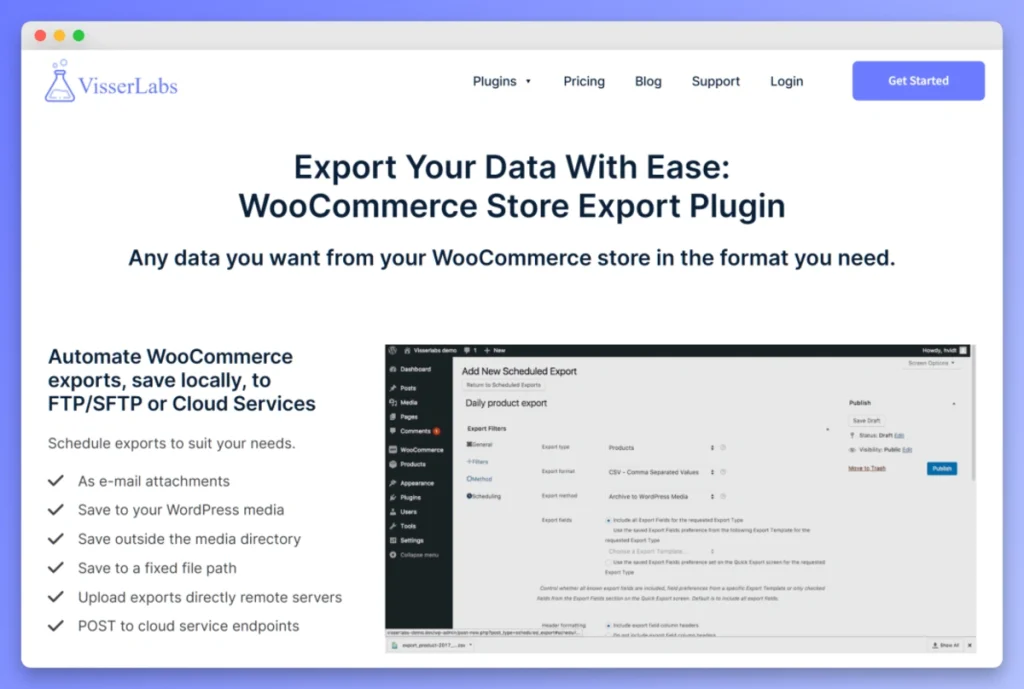
The plugin natively integrates with over 125 WordPress and WooCommerce extensions. That means it understands the data structures of popular plugins like WooCommerce Subscriptions, Advanced Custom Fields, and dozens of others, producing clean, structured exports without manual field mapping.
Store Exporter Deluxe outputs to seven file formats: CSV, TSV, XLS, XLSX, XML, JSON, and RSS. It also includes scheduled exports, smart filtering, custom field support, and multiple delivery options including email, FTP/SFTP, and cloud service integration.
Who is Store Exporter Deluxe best for?
Store Exporter Deluxe is ideal for store owners who primarily need to export data, running regular order exports for bookkeepers, pulling product data for third-party catalogs, or automating nightly exports to fulfillment systems. It is particularly strong for stores running multiple WooCommerce extensions, thanks to those 125+ native integrations that keep exported data clean and properly structured.
What Is WebToffee Import Export Suite?
WebToffee Import Export Suite is a comprehensive all-in-one WooCommerce plugin that handles both importing and exporting data, bundling five modules covering products, orders, coupons, subscriptions, users, customers, and reviews. It takes a different approach from dedicated export tools by offering bidirectional data management.
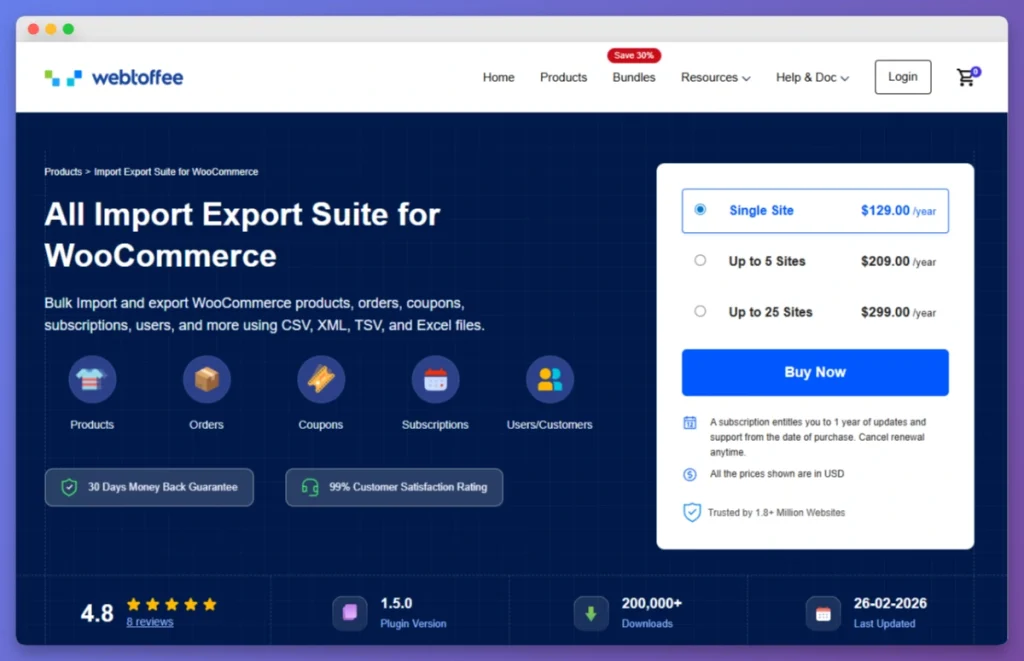
According to WordPress.org plugin data, WebToffee’s product import export plugin has over 90,000 active installations and strong user ratings. The suite supports CSV, XML, TSV, and Excel formats and handles all WooCommerce product types.
WebToffee also includes a ChatGPT integration that generates product descriptions during import, which may appeal to stores importing large catalogs from suppliers with limited product data.
Who is WebToffee best for?
WebToffee may work for store owners who want import and export handled by one plugin and don’t require deep third-party extension support. Keep in mind that the bundled approach means you’re paying for import functionality even if your day-to-day need is primarily exporting data.
How Do The Export Features Compare?
Both plugins cover core WooCommerce data types, but the comparison reveals a significant gap in export capability. Store Exporter Deluxe’s 125+ native plugin integrations give it a clear advantage for export accuracy, depth, and third-party extension data.
Store Exporter Deluxe understands the data schema of plugins like WooCommerce Subscriptions, WooCommerce Bookings, and Advanced Custom Fields. When we set up a product export in Store Exporter Deluxe, the field mapper auto-detected all WooCommerce fields including custom meta from ACF, with no manual configuration needed. When you export subscription data, it pulls subscription-specific fields cleanly rather than dumping raw post meta.
WebToffee handles standard WooCommerce data types well with its modular approach. In our testing, WebToffee’s interface required us to navigate through its combined import/export wizard to reach the export-specific options, which added a few extra clicks compared to Store Exporter Deluxe’s direct export screen. However, third-party plugin integrations are more limited compared to Store Exporter Deluxe’s extensive native support.
Which plugin supports more output formats?
Store Exporter Deluxe supports seven output formats (CSV, TSV, XLS, XLSX, XML, JSON, RSS) compared to WebToffee’s four (CSV, XML, TSV, Excel), making it the better choice if your workflows require JSON for API integrations, RSS for product syndication, or specific legacy formats.
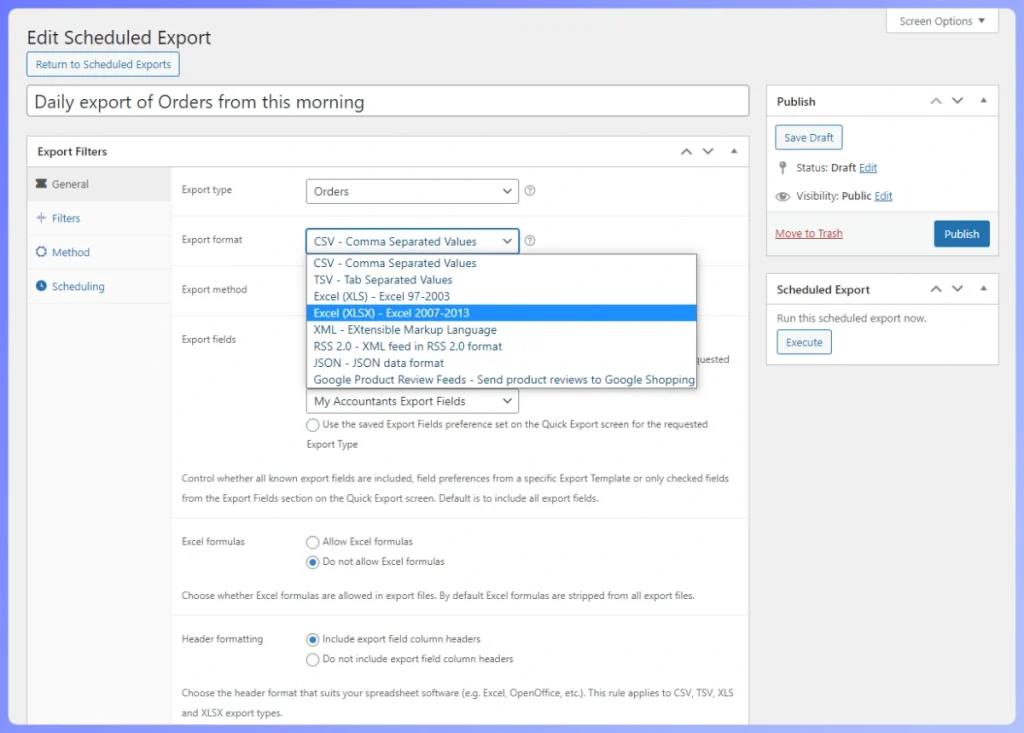
For many store owners, CSV and Excel cover 90% of use cases. But if your accountant wants XLSX files, your fulfillment partner needs XML, and your reporting tool expects JSON, Store Exporter Deluxe handles all three without additional tools or manual file conversions.
How do scheduled exports compare?
Both plugins offer scheduled exports, but Store Exporter Deluxe provides more delivery options, including email attachments, WordPress Media library, external directory saves, FTP/SFTP upload, and POST to cloud services, while WebToffee focuses on FTP/SFTP delivery.
When we configured a daily order export with Store Exporter Deluxe, the process was straightforward. We selected the data type, set filters, chose a schedule, entered an email address, and the configuration was done. The next morning, the export arrived as an XLSX attachment ready for a bookkeeper.
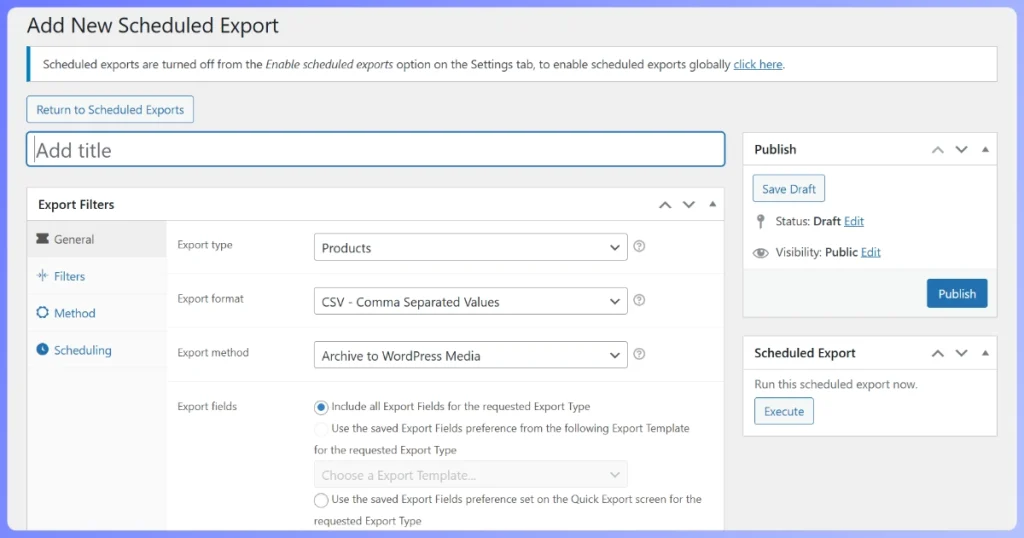
WebToffee supports scheduled exports with FTP and SFTP connections. We noticed that WebToffee’s scheduling interface is functional, though navigating through the broader import/export workflow adds extra steps to reach export-specific options.
What about filtering and custom fields?
Both plugins offer filtering by date ranges, product categories, order statuses, and customer roles, but Store Exporter Deluxe’s smart filters and automatic custom field detection from 125+ plugins give it an edge for complex export scenarios.
Store Exporter Deluxe lets you combine multiple filters, target specific custom fields from third-party plugins, and save filter configurations for recurring exports. Fields from extensions like Advanced Custom Fields and YITH plugins are recognized automatically.
WebToffee offers advanced filtering by product type, category, and date range. Filtering on custom fields from third-party plugins may require more manual configuration.
What We’ve Seen: Store owners who run multiple WooCommerce extensions often don’t realize how much custom field data their plugins generate until they try to export it. We commonly see stores with WooCommerce Subscriptions, Product Add-Ons, and ACF all active, and when they run an export with a tool that doesn’t auto-detect those fields, they get a CSV full of gaps. This is where native plugin integration makes a measurable difference.
Does WebToffee’s AI integration make a difference?
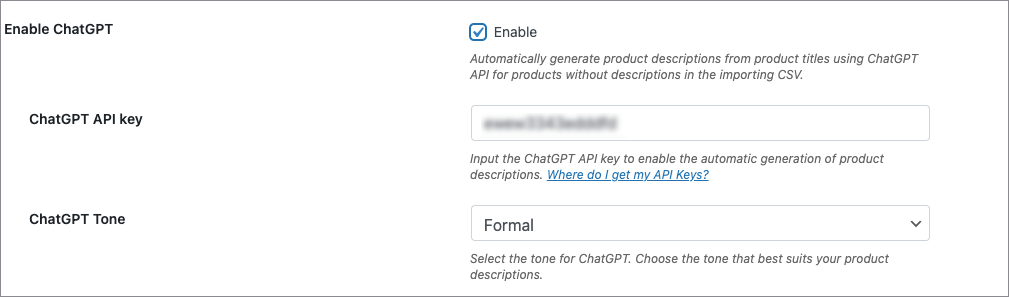
WebToffee includes a ChatGPT integration that generates product descriptions during import, useful for stores importing large catalogs from suppliers who provide minimal product information. You connect your ChatGPT API key, choose a tone of voice, and the plugin creates descriptions automatically.
However, this is an import feature, not an export feature. If your primary need is exporting data, you will not use this capability. Store Exporter Deluxe takes a different approach, focusing on precise control through detailed field selection, custom field mapping, and smart filtering.
If you are considering Store Exporter Deluxe, see how it also compares against WP All Export for another perspective on dedicated export tools.
How does the user interface compare?
Store Exporter Deluxe presents a clean, export-focused interface where export options are front and center, with no import controls competing for screen space. WebToffee combines import and export in a single step-by-step wizard that can feel cluttered if you only need export functionality.
WebToffee’s unified interface makes sense for stores that genuinely use both import and export features. For export-only users, the shared navigation means you are always one click away from accidentally starting an import workflow.
Full Feature Comparison Table
Store Exporter Deluxe vs WebToffee breaks down to a specialist tool with deeper export capabilities versus an all-in-one suite with broader but shallower coverage. Here is the complete comparison across 12 key features.
| Feature | Store Exporter Deluxe | WebToffee Import Export Suite |
|---|---|---|
| Export Formats | CSV, TSV, XLS, XLSX, XML, JSON, RSS | CSV, XML, TSV, Excel |
| Import Functionality | No (separate plugin available) | Yes (built-in) |
| Supported Data Types | Orders, Subscriptions, Products, Categories, Tags, Customers, Reviews, Coupons | Products, Orders, Coupons, Subscriptions, Users, Customers, Reviews |
| Plugin Integrations | 125+ native integrations | Limited third-party integrations |
| Scheduled Exports | Yes | Yes |
| Export Delivery | Email, FTP/SFTP, Media Library, Cloud POST | FTP/SFTP |
| Custom Field Support | Automatic detection from 125+ plugins | Manual configuration |
| AI/ChatGPT Integration | No | Yes (product descriptions) |
| Filtering Options | Smart filters with saved configurations | Advanced filters by type, category, date |
| Interface Style | Export-focused, single-purpose | Combined import/export wizard |
| WordPress Multisite | Yes | Yes |
| Large Dataset Handling | Optimized for 50,000+ records | Standard processing |
How Does Pricing Compare?
In a Store Exporter Deluxe vs WebToffee pricing comparison, Store Exporter Deluxe starts at $39.50/year for a single site, which is 43% less than WebToffee’s $69/year entry point, giving export-focused store owners better value with more export formats and deeper plugin integrations included.
| Plan | Store Exporter Deluxe | WebToffee Import Export Suite |
|---|---|---|
| Single Site (Year 1) | $39.50/year | $69/year |
| Single Site (Renewal) | $79/year | $69/year |
| Multi-Site (5 sites) | Unlimited Sites tier available | $129/year |
| Multi-Site (25 sites) | Unlimited Sites tier available | $249/year |
| Money-Back Guarantee | 14-day refund policy | 30-day money-back guarantee |
| Includes Import | No (separate plugin) | Yes |
Many store owners start with WebToffee thinking they will save by using one plugin for both import and export. But if your primary need is exporting, you end up paying more for import features you may never use.
Even at the $79 renewal rate, Store Exporter Deluxe delivers more export formats and deeper integrations. If you do need import functionality later, Visser Labs offers Product Importer Deluxe as a separate plugin. View current pricing plans for full details.
Which Plugin Should You Choose?
For most WooCommerce store owners evaluating Store Exporter Deluxe vs WebToffee, Store Exporter Deluxe is the stronger choice. It offers more export formats, deeper plugin integrations, more delivery options, and a lower entry price.
Choose Store Exporter Deluxe if:
- Your primary need is exporting WooCommerce data (orders, products, customers, subscriptions)
- You need formats beyond CSV and Excel (JSON, XML, RSS, TSV)
- Your store runs multiple WooCommerce extensions that add custom data
- You want automated exports delivered via email, FTP/SFTP, or cloud services
- You prefer a focused, clutter-free export interface
WebToffee may be worth evaluating only if all of the following apply to your store:
- You need import and export bundled into one plugin and do not rely on third-party WooCommerce extensions
- You are actively importing large supplier catalogs and want AI-generated descriptions during that process
- Deeper export format support and scheduled delivery options are not priorities for your workflow
For a broader look at WooCommerce export options, browse our roundup of the best WooCommerce export plugins.
Final Verdict: Store Exporter Deluxe vs WebToffee, Which Is The Better WooCommerce Export Plugin?
For WooCommerce store owners whose primary challenge is getting data out of their store reliably, Store Exporter Deluxe is our clear recommendation over WebToffee’s Import Export Suite. It costs less in year one ($39.50 vs $69), exports to nearly twice as many formats (seven vs four), and integrates natively with 125+ WooCommerce extensions.
WebToffee includes import functionality and a ChatGPT feature, which may be relevant if you have a specific need for bidirectional data management. However, for the majority of store owners whose core need is reliable, flexible data export, those additions don’t offset the gap in export depth and higher price. But for export-focused store owners, which is the majority of people comparing these two plugins, Store Exporter Deluxe delivers more capability at a better price.
Ready to see the difference a purpose-built export tool makes? Try Store Exporter Deluxe today or view pricing plans to get started.
Frequently Asked Questions
Can I use Store Exporter Deluxe and WebToffee together?
Yes, both plugins run on the same WooCommerce store without conflicts. However, there is rarely a reason to do so since Store Exporter Deluxe covers export functionality comprehensively. If you need import capabilities alongside it, consider pairing with Product Importer Deluxe instead of adding redundant export overhead.
Which plugin is better for exporting WooCommerce orders?
Store Exporter Deluxe has the edge for order exports. It supports more output formats including JSON and RSS, offers more delivery methods for automated exports, and its 125+ native plugin integrations mean order data from extensions like WooCommerce Subscriptions exports cleanly without manual field mapping.
Is WebToffee’s ChatGPT feature worth the higher price?
That depends on your workflow. If you regularly import products from suppliers with minimal descriptions, the ChatGPT integration may reduce some manual writing work. However, it is an import feature, not an export feature. If you are primarily exporting data, you are paying extra for AI capability you will not use.
Can either plugin handle 50,000+ record exports?
Both plugins handle large exports, though performance depends on your hosting environment. Store Exporter Deluxe’s purpose-built architecture gives it an advantage for very large datasets. We recommend managed WooCommerce hosting and running large exports during low-traffic periods regardless of which plugin you choose.
Does Store Exporter Deluxe support importing data?
Store Exporter Deluxe focuses exclusively on exports. For importing, Visser Labs offers Product Importer Deluxe as a separate plugin. This modular approach means you only pay for the functionality you actually need, rather than bundling import and export together at a higher price point.