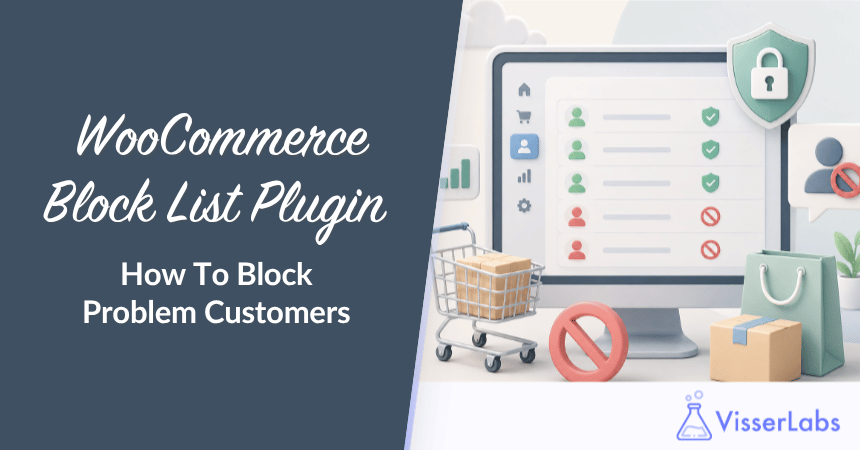
Checkout Guard for WooCommerce is a plugin that blocks orders from specific customers by name, email or IP address. You add the people you want to stop to a block list, and when an incoming order matches an entry, the order never goes through.
Today we’re launching it on Visser Labs, and you can put it to work in about a minute.
If you run a WooCommerce store for any length of time, you eventually meet them: the same handful of people who keep placing orders you don’t want. Maybe it’s a repeat chargeback artist. Maybe it’s someone who fills your queue with junk orders to waste your time. Whatever the reason, you already know who they are, and you’re tired of catching them by hand every single time.
We built Checkout Guard for that exact frustration, and in this article we’ll walk you through what it does, the problem it solves, and how to get it.
Table of Contents
What Is Checkout Guard For WooCommerce?
Checkout Guard is a manual block list for WooCommerce checkout. You add an entry using a first name and last name, an email address, an IP address, or any combination of those. When a new order comes in and it matches an entry, Checkout Guard stops the order before it lands in your store.
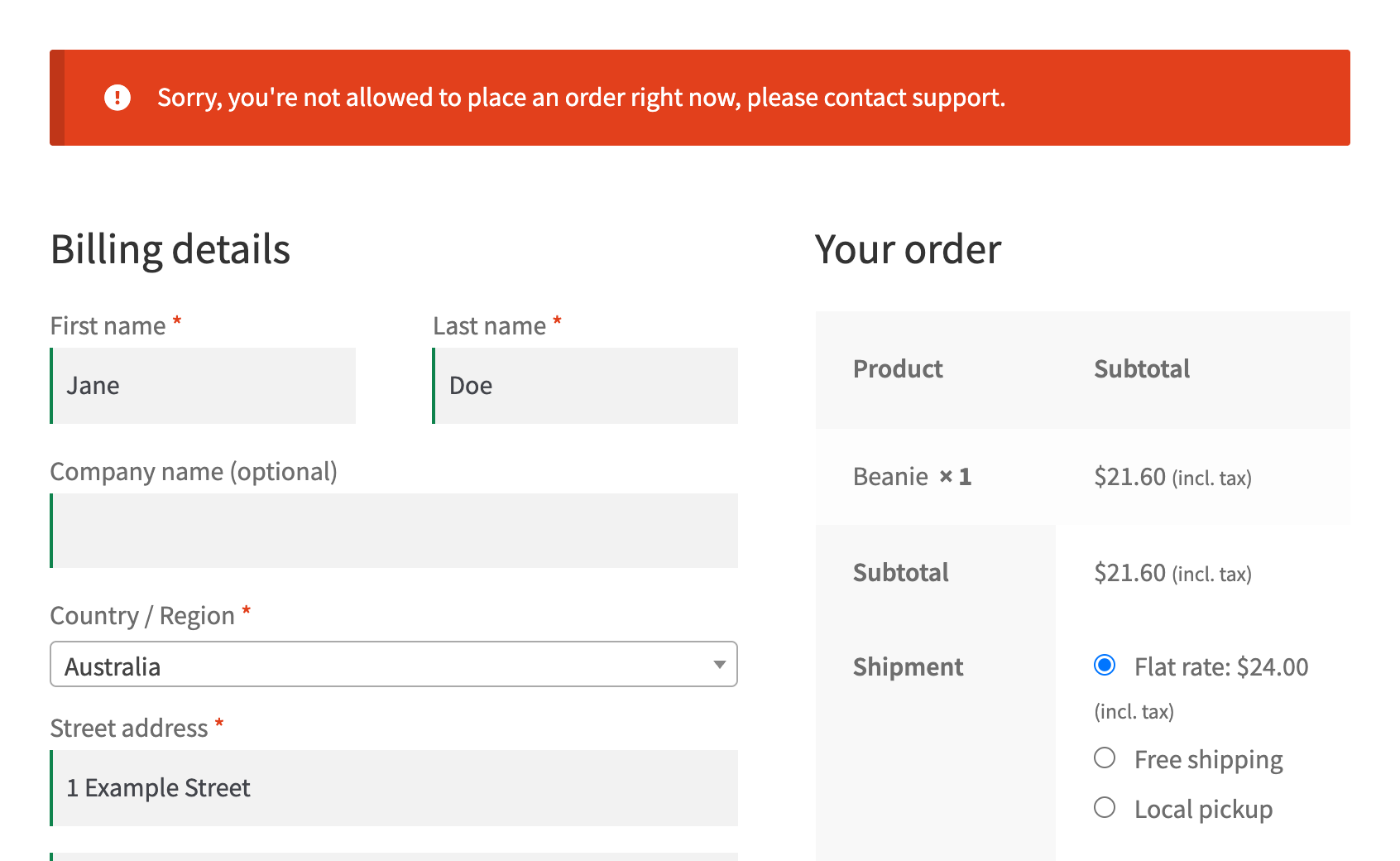
The match is exact and case-insensitive by default. So “[email protected]” and “[email protected]” are treated as the same address, but a near-miss or a different spelling won’t trigger a block on its own. That’s by design. Checkout Guard blocks the people you’ve already identified, and it leaves everyone else alone. Since version 1.0.2 you can widen a rule deliberately with a * wildcard, which is how a single entry covers a whole email domain or an IPv4 range.
When a match happens, three things occur at once. The order is deleted, the cart is emptied, and the shopper sees a denial message that you write yourself in the settings. There’s no half-finished order sitting in your dashboard and no payment to refund later.
The Problem It Solves
Most fraud tooling is built to catch strangers. That’s a real problem for big merchants: Juniper Research projected online payment fraud losses would reach $48 billion globally by 2023 (The Fast Mode). And with WooCommerce running 48.6% of all known e-commerce sites (W3Techs), a lot of those stores are looking for an answer.
But here’s the thing. For most small and mid-sized stores, the real headache isn’t an anonymous global crime ring. It’s a few known, repeat offenders you can name. A scoring engine that weighs proxies, geolocation, and transaction velocity is overkill when your actual problem is three email addresses you’d recognize in your sleep.
What We’ve Seen: Store owners often try to solve a “known person” problem with a “catch the unknown” tool, then spend weeks tuning rules and chasing false positives that block genuine buyers. When the problem is a short list of specific people, a deterministic block list does the job cleanly without touching anyone else’s order.
Checkout Guard takes the opposite approach. There’s no scoring, no external service to call, and no risk model to second-guess. You decide who gets blocked, and only those people get blocked. That means zero false positives for anyone who isn’t on your list.
How We Built It
We built Checkout Guard for WooCommerce in-house at Visser Labs, the same team behind Store Exporter Deluxe. We’ve spent years deep in WooCommerce internals, and that shaped two decisions that matter.
First, Checkout Guard works on all WooCommerce checkout setups, whether you’re using the classic checkout or the newer block-based one. Second, the admin stays simple, with just two tabs: Blocked Entries for your list, and Settings for your denial message and license key.
We resisted the urge to bolt on features that sound impressive but get in the way. Checkout Guard does one job and does it predictably.
💡 For the wider context, our guide on how to stop spam orders in WooCommerce covers the full picture, and you can grab Checkout Guard whenever you’re ready.
How Do You Use Checkout Guard?
There are four steps from install to blocking. Here’s exactly what the admin looks like.
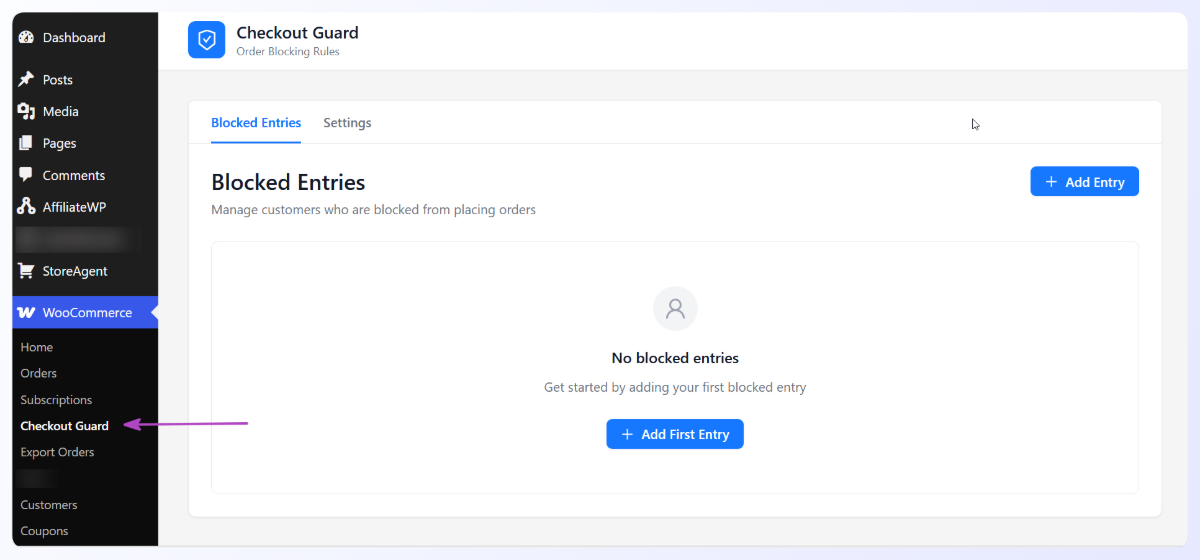
Step 1: Go to WooCommerce > Checkout Guard
After installing and activating the plugin, find Checkout Guard listed under WooCommerce in your WordPress admin sidebar. Click it and you’ll land on the Blocked Entries tab.
Step 2: Set your denial message
Before adding anyone, click the Settings tab. You’ll see a Checkout Denial Message field. This is what a blocked customer sees when they try to place an order.
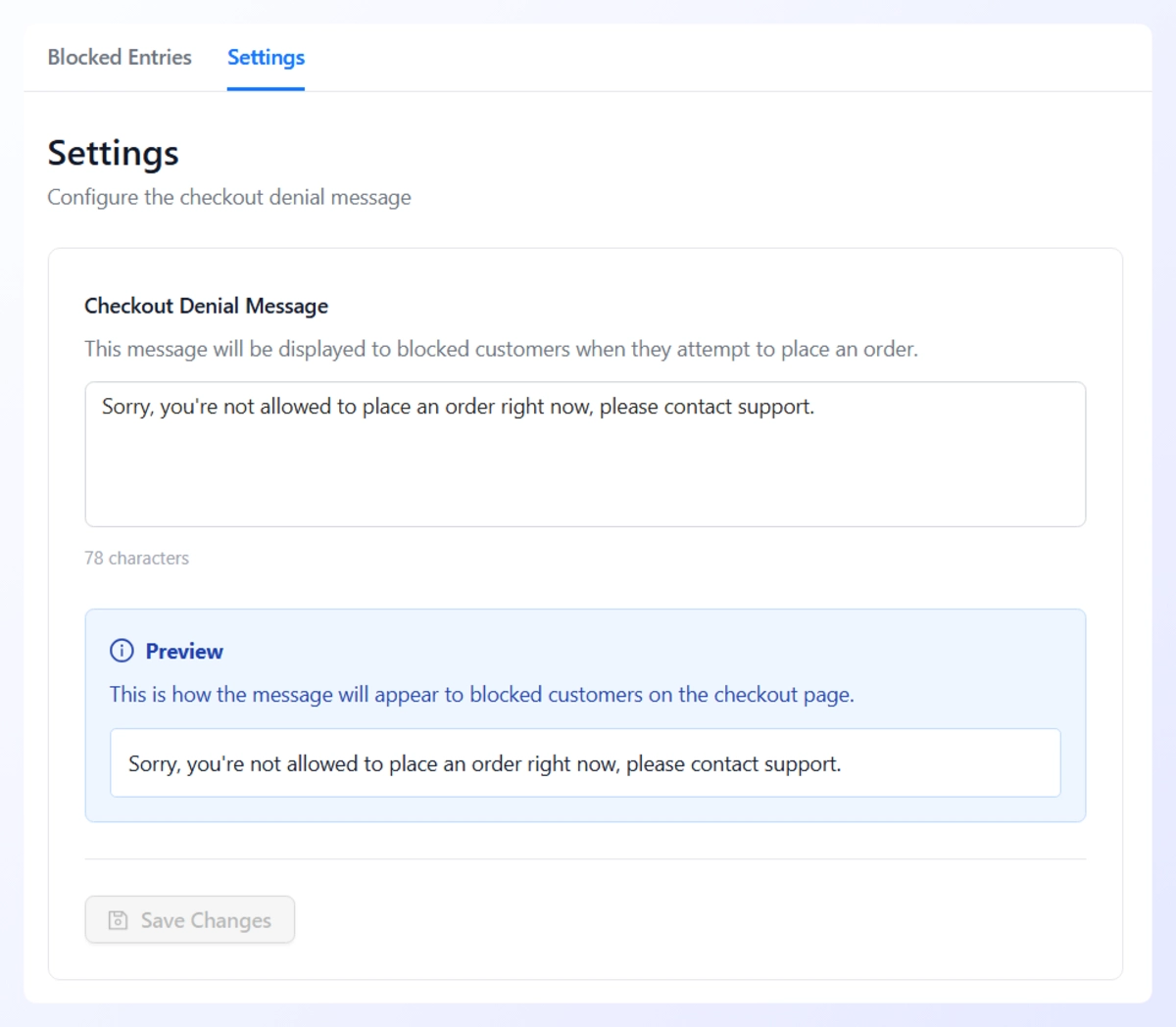
The default reads “Sorry, you’re not allowed to place an order right now, please contact support.” Rewrite it to match your store’s tone. There’s a live preview below the field so you can see exactly how it appears at checkout. Hit Save Changes.
Step 3: Add a blocked entry
Back on the Blocked Entries tab, click + Add Entry. A modal opens with four fields: First Name, Last Name, Email Address, and IP Address.
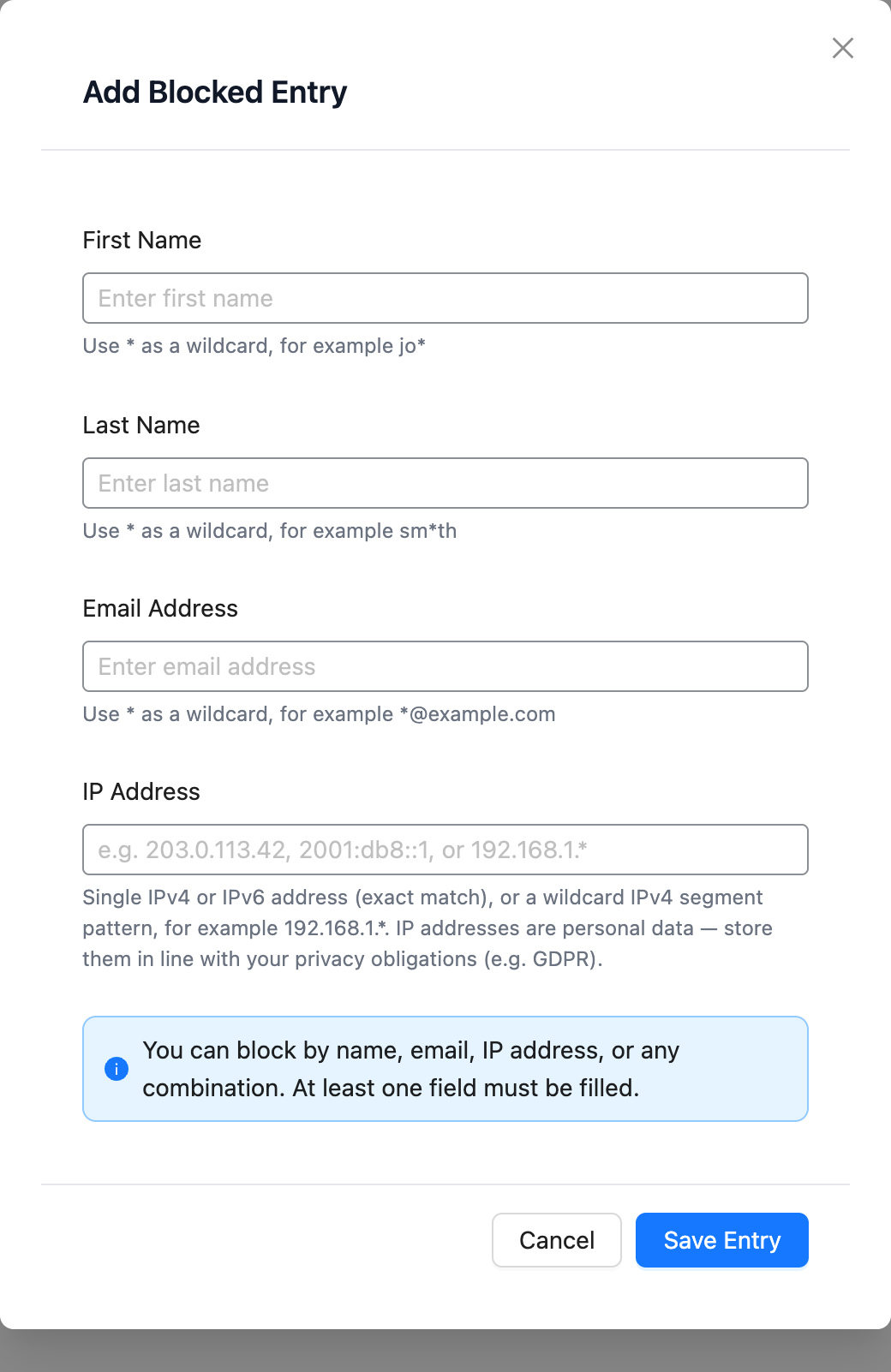
You can block by name, email, IP address, or any combination. At least one field has to be filled. Click Save Entry when you’re done.
💡 Practical Tip: Where you can, block by email rather than name. Names repeat across different customers, but an email address points to one person, so it’s the cleaner, safer match.
Step 4: The block is live immediately
The entry appears in your list straight away, with tags showing whether Checkout Guard is matching by Name, Email, or both. From that point on, anyone who tries to order using those exact billing details gets stopped at checkout. The order is deleted, the cart is cleared, and your denial message is shown. No pending orders, no refunds to process.
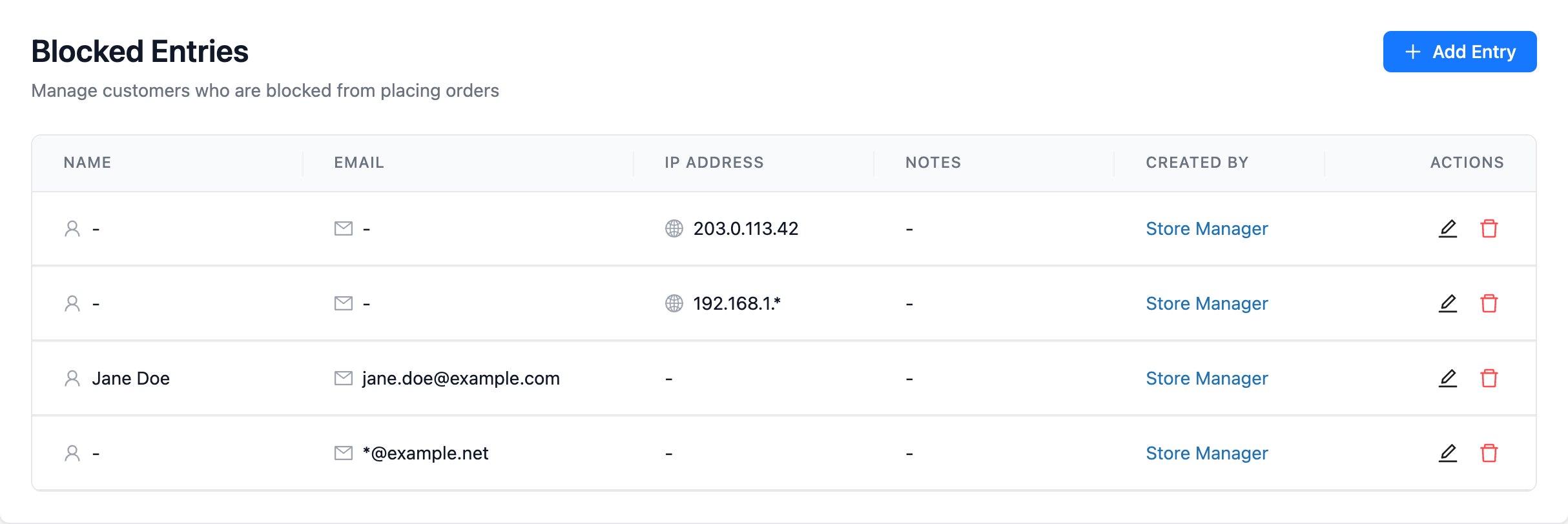
That’s the whole setup. Under a minute for the first entry!
Where To Get Checkout Guard
Checkout Guard for WooCommerce is a paid, licensed plugin available now from the Checkout Guard page. Adding your first entry takes about a minute: enter the name and email of the person you want to block, save, and you’re done. The next time they try to order, they’re stopped automatically.
If you’re already a Visser Labs user, this slots in alongside tools you may know, like Store Toolkit for store management or our WooCommerce export plugins for getting data out of your store. Same team, same focus on doing one thing reliably.
Start Blocking Problem Orders Today
You already know who the repeat offenders are. Checkout Guard just makes stopping them automatic, so you stop catching the same names by hand.
Checkout Guard has moved on since this launch post. Version 1.0.2 added three things worth knowing about: you can block an IP address in WooCommerce, use a wildcard to block an email domain in WooCommerce with one rule, and manage the whole list over the WooCommerce block list API.
Here’s a quick recap of what we covered:
- What Checkout Guard actually is: a manual block list keyed on billing name and email.
- The problem it solves: known, repeat offenders, without false positives.
- How we built it: in-house at Visser Labs, working on classic and block checkout.
- How to use Checkout Guard: four steps from install to your first blocked entry.
- Where to get Checkout Guard: a paid, licensed plugin available now.
If you’re ready to stop them for good, get Checkout Guard for WooCommerce and add your first blocked entry in under a minute.
Frequently Asked Questions
What does Checkout Guard do?
Checkout Guard for WooCommerce blocks orders from people you add to a block list. You enter a billing first name and last name, an email address, or both. When an incoming order matches an entry exactly (case-insensitive), the order is deleted, the cart is emptied, and the shopper sees a denial message you write. It blocks people you’ve already identified, not strangers.
Does it work with the new block checkout?
Yes. Checkout Guard works on both the classic shortcode checkout and the Block (Store API) checkout. You don’t need to change your checkout setup or pick a specific cart plugin. Whichever checkout your theme uses, the block list is enforced the same way before the order completes.
Does Checkout Guard detect fraud automatically?
No. Checkout Guard is a deterministic, manual block list, not a fraud detection engine. It doesn’t score orders, check payment cards, or flag “suspicious” activity on its own. It matches an IP address only when you add one to the list yourself. It blocks exactly the people you add to it and nobody else, which means no false positives for anyone off your list.
Do I need a paid plan to use Checkout Guard?
Yes. Checkout Guard is a paid, licensed plugin. After you buy a license, you install it on your WooCommerce store, enter your license key in the Settings tab, and your block list is enforced on every order right away.
Where can I buy Checkout Guard?
Checkout Guard is available now as a paid, licensed plugin from the Checkout Guard page on the Visser Labs site. Install it on your WooCommerce store, enter your license key in the Settings tab, and start adding entries to your block list straight away.