The best ecommerce strategies for 2026 revolve around clean data, smart personalization, and meeting customers where they shop. Growing an online store now requires different tactics than two years ago. Running ads alone doesn’t work anymore.
Sound familiar? Most store owners try tactics that worked years ago and wonder why results feel flat. Meanwhile, the best ecommerce strategies focus on foundations first. Clean product data, targeted promotions, and multi-channel selling deliver better returns than chasing the newest trend.
These nine strategies work on any platform. Each one includes steps you can start today. WooCommerce users get specific tools that make things easier. Let’s look at what drives sales for online stores right now.
Quick Overview: Ecommerce Strategy Overview
| Strategy | Difficulty | Time to Results | Best For | Key Tools Needed |
|---|---|---|---|---|
| 1. Optimize Product Data | Medium | 1-2 weeks | All stores | Visser Labs Export/import plugins, spreadsheet |
| 2. Targeted Promotions | Easy | Immediate | Stores with good margins | Advanced Coupons, analytics |
| 3. Personalization | Medium | 2-4 weeks | Stores with repeat customers | StoreAgent AI chat, email platform, customer data |
| 4. Pre-Purchase Support | Easy | 1 week | Stores with complex products | StoreAgent AI chatbot, FAQ tools |
| 5. Multi-Channel Feeds | Medium | 2-3 weeks | All stores ready to scale | AdTribes Product feed plugin, channel accounts |
| 6. Marketplace Model | Hard | 3-6 months | Established stores | WC Vendors Multi-vendor plugin, vendor policies |
| 7. Wholesale Channel | Medium | 2-4 weeks | Stores with bulk-friendly products | Wholesale Suite plugin, pricing tiers |
| 8. Wishlist Marketing | Easy | 1-2 weeks | Stores with browsers who don’t buy | Saveto Wishlist plugin, email automation |
| 9. Analytics & Testing | Easy | Ongoing | All stores | Visser Labs Store Exporter Deluxe, Google Analytics |
Table of Contents
- What Are The 9 Best Ecommerce Strategies For Online Stores?
- 1. Optimize product data and structure
- 2. Run smarter, data-driven promotions
- 3. Personalize marketing and customer experience
- 4. Improve pre-purchase support
- 5. Expand to Google Shopping and multi-channel feeds
- 6. Scale with Multi-Vendor marketplace models
- 7. Add Wholesale as a growth channel
- 8. Build customer retention with Wishlist marketing
- 9. Use analytics and continuous testing
- Start Using The Best Ecommerce Strategies Today
- Frequently Asked Questions
What Are The 9 Best Ecommerce Strategies For Online Stores?
Each strategy below tackles a specific revenue driver for ecommerce stores. Pick one, test it for two weeks, then move to the next. If the marketplace model further down appeals and you plan to run auctions, read up on anti-sniping and extend-on-bid closing rules for auction marketplaces before you open your first lot.
1. Optimize product data and structure
Your product catalog affects everything you do in ecommerce. When titles don’t match, categories overlap, and details are missing, customers can’t find products, and your feeds pull wrong data. According to YouGov Study, 83% of consumers would abandon a website if it lacked comprehensive product information, while 73% view brands less favorably when they encounter incomplete or inaccurate data.
How to optimize product data and structure?
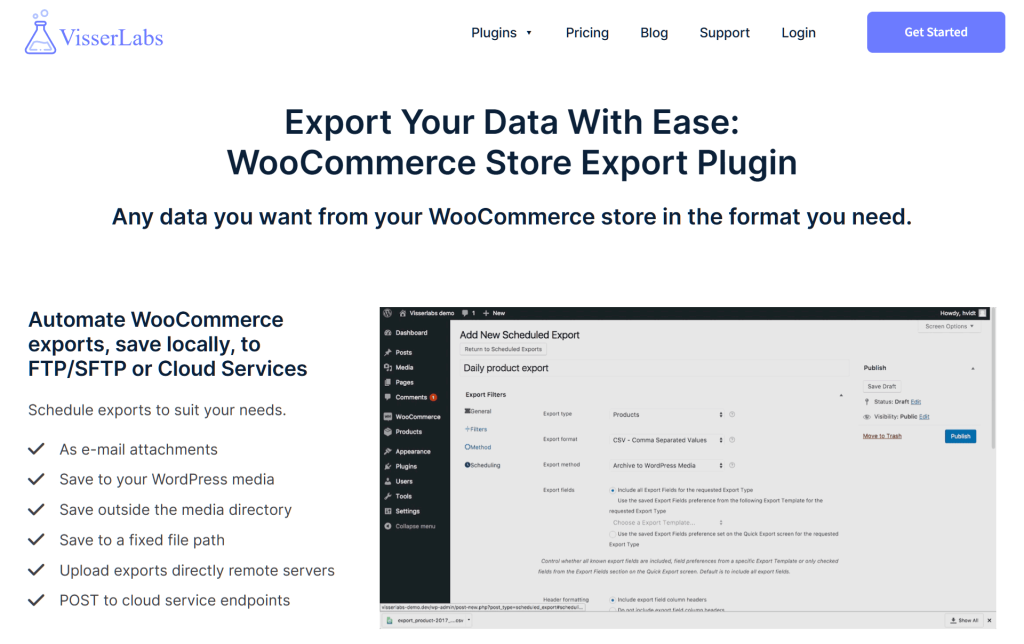
Start by exporting your full product catalog. Look for duplicate categories and missing details. Then clean it up in a spreadsheet where you can see patterns clearly.
I used Store Exporter Deluxe from Visser Labs to pull product data from a WooCommerce demo store. It handled the export quickly, even with a large catalog. After cleaning up the data, I used Product Importer Deluxe to push updates back in bulk.
This saved hours compared to editing products one by one. Clean data immediately improved site search results.
2. Run smarter, data-driven promotions
Site-wide discounts train customers to wait for sales, forcing you to compete only on price. Targeted promotions work differently. They focus on high-margin items and increase order value without conditioning customers to expect constant discounts. This is one of the best ecommerce strategies for protecting your bottom line.
How to set up targeted promotions?
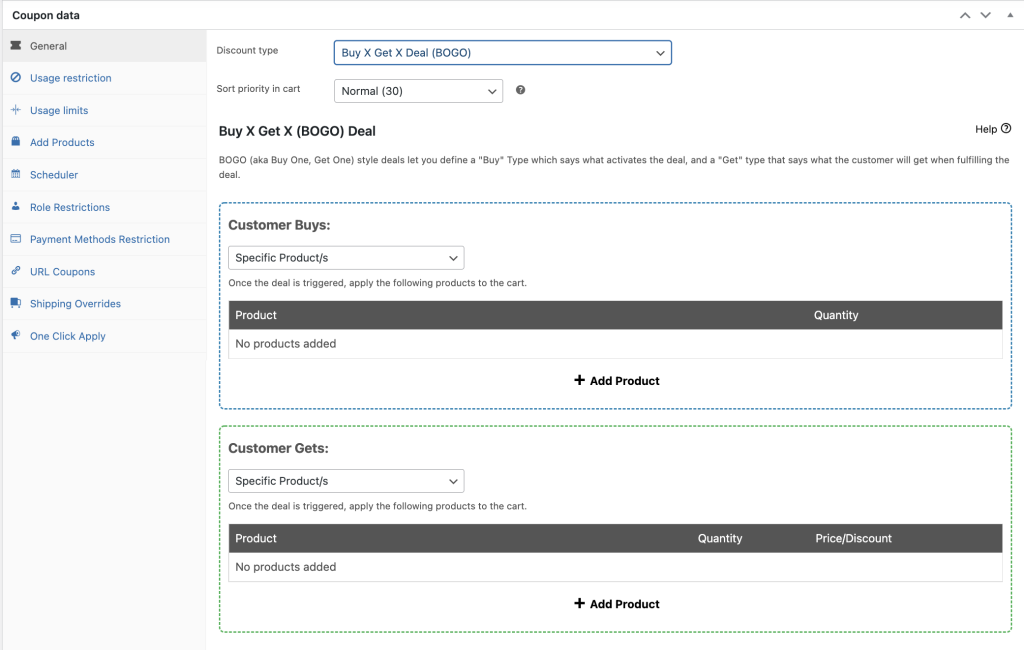
First, check which products sell well and have good margins. Then create offers with conditions—like buy product A and get product B half off, spend $100 for free shipping, or buy from this category and earn store credit.
I tested Advanced Coupons to set up these promotions on a demo store. It handles BOGO deals, cart discounts, bundles, and store credit with conditional logic. This made it easy to create targeted offers instead of just “20% off” for everyone.
3. Personalize marketing and customer experience
Generic recommendations don’t work anymore. Instead, customers expect experiences based on what they bought before. They want to see products that match their interests.
Fortunately, your store already has the data you need. You just need to use it right. Personalization ranks among the best ecommerce strategies for building customer loyalty.
How to segment customers for personalized marketing?
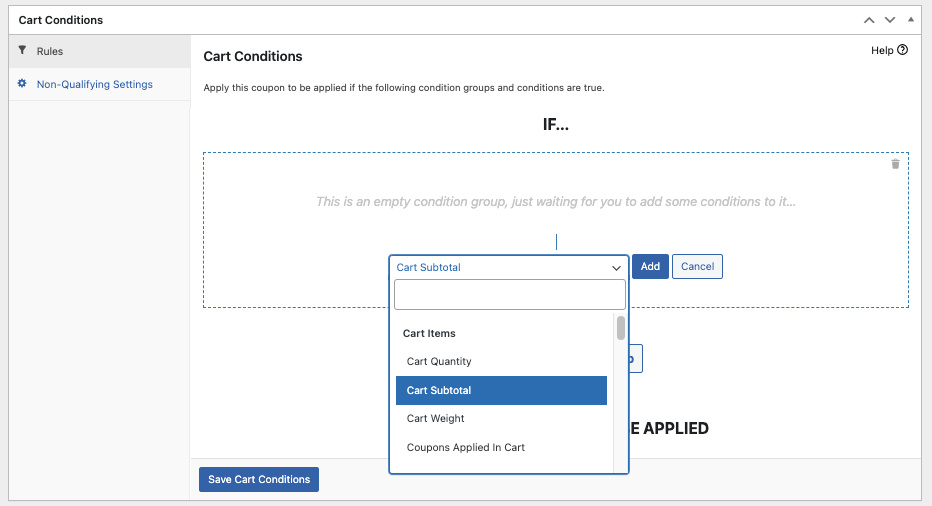
Start by splitting customers into groups based on purchase history and browsing behavior. Then create different campaigns for each segment.
Next, I created targeted coupons with Advanced Coupons based on customer segments. VIP customers got BOGO deals restricted to their user role. I set up bundle discounts for specific categories and cart-condition rewards like “spend $150, get $30 store credit” for high spenders.
This approach increases perceived value without racing to the bottom on price. You can send these targeted coupons through your email platform instead of running sitewide discounts everyone sees.
4. Improve pre-purchase support
Many shoppers leave because they have unanswered questions. When they can’t find answers fast, they leave and shop elsewhere. Good pre-purchase support answers questions on product pages and cart pages, not just after someone buys. This approach removes doubts during the decision-making process.
How do I add AI chat for better pre-purchase support?
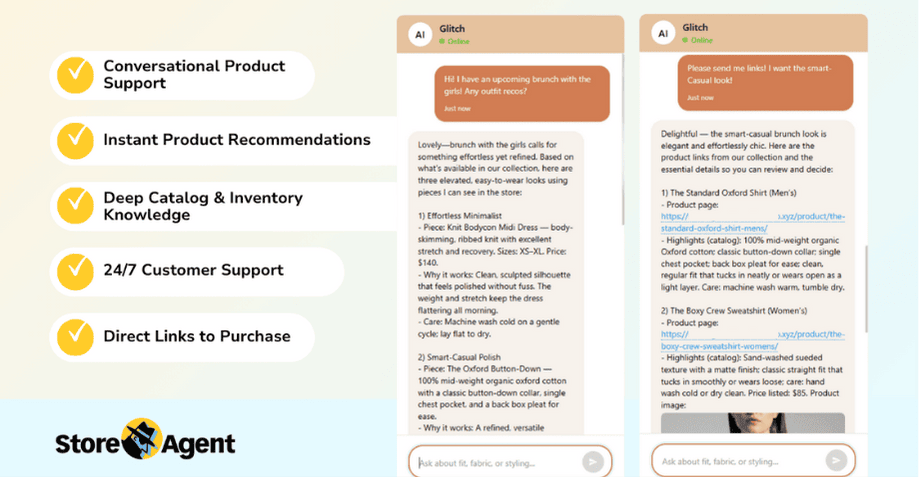
First, check your support tickets to find common questions people ask before buying. Then add detailed FAQs to product pages. Make your shipping and return policies easy to find.
I installed StoreAgent Chat, a WooCommerce AI chatbot, on a WooCommerce demo store to test this approach. It’s built specifically for WooCommerce, so it pulls from actual product data, inventory levels, and your store’s content. I turned on the setting that lets it read posts and pages first, which meant it could answer policy questions by referencing my shipping and return pages.
During testing, it answered stock questions accurately because it was reading current inventory levels. It also handled product specification questions by pulling details directly from the catalog. When customers asked about sizing or compatibility, it referenced the exact information from product descriptions and custom fields. It has definitely provided the best e-commerce customer support before purchase.
5. Expand to Google Shopping and multi-channel feeds
Customers browse many places now. Google Shopping, Facebook, Instagram, TikTok, comparison sites. If you only sell on your website, you miss most potential buyers.
According to Amra & Elma’s omnichannel marketing research, 40.4% of eCommerce sales are attributed to omnichannel strategies. Furthermore, purchase rates increase by 287% when using three or more channels compared to single-channel campaigns. Product feeds make this possible without tons of manual work.
How to sell on Google Shopping and multiple channels?
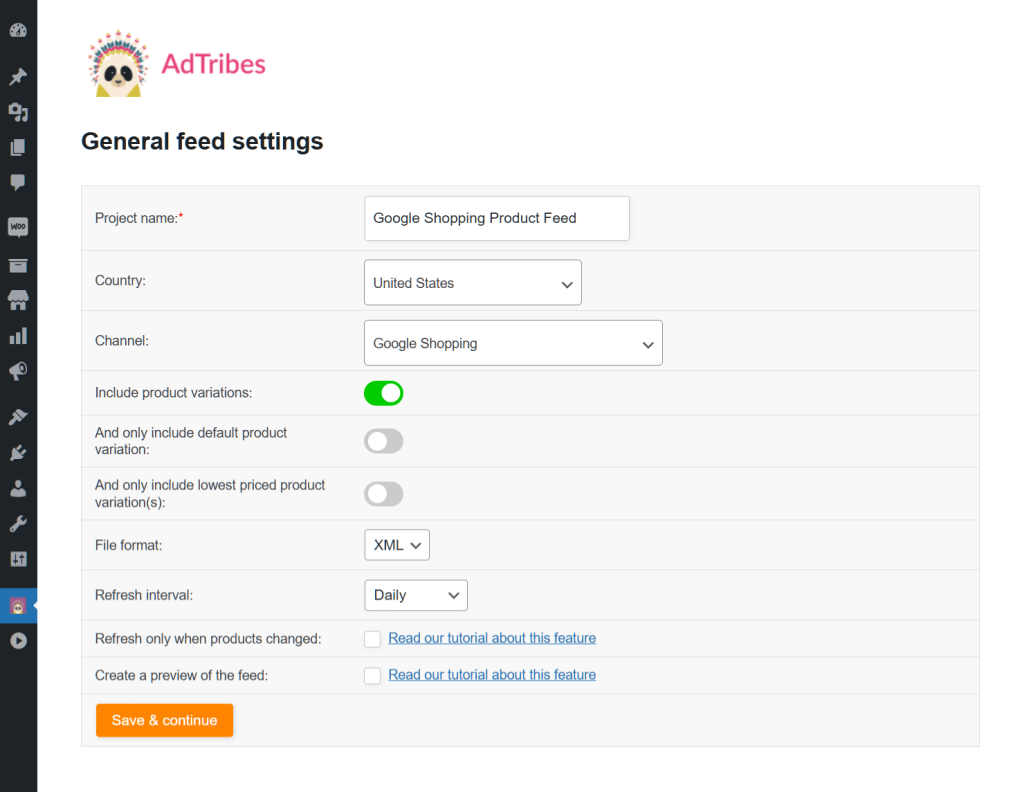
First, find which channels your customers use most. Then create product feeds for each channel. Watch which platforms convert best and focus your effort there.
I installed AdTribes Product Feed Pro on a test store to see how it worked. It automatically created feeds for Google Shopping, Facebook, TikTok, Bing, and other channels. The feeds pulled directly from the WooCommerce catalog and updated when I changed products.
This made workflow much simpler. I edited products once in WooCommerce, and changes went everywhere automatically. There was no need to update each platform separately.
6. Scale with Multi-Vendor marketplace models
Once your store works well, you can invite other sellers to join your platform. Your catalog grows fast without holding inventory. You earn commissions on every sale.
This is different from selling on Amazon or eBay. This is about becoming like Amazon yourself, just for your niche. Easy, right?
However, this works best after building your own brand first. Then you use that existing audience to attract sellers who want access to your customers. This is one of the best ecommerce strategies for exponential growth.
How to build an online marketplace?
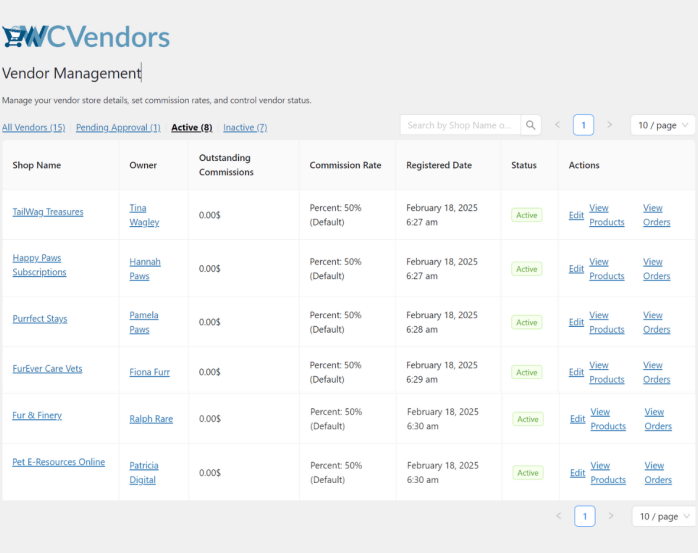
Start by setting your commission rates. Write clear vendor policies and define your quality standards. Then set up vendor registration and product approvals.
Make sure payments split automatically. Finally, market to both sellers and buyers at the same time. To test this further, I installed WC Vendors on a demo store.
It transformed the site into a multi-vendor marketplace where other sellers could list products. I controlled commissions, branding, and rules while they managed their own inventory. During testing, I noticed this works best after you’ve already established trust with buyers.
7. Add Wholesale as a growth channel
B2B and wholesale buyers represent a different income stream. Business buyers order larger amounts and reorder on schedule. As a result, you get volume sales without finding new customers every time.
Additionally, many stores add wholesale pricing without building a new website. Retail and wholesale can work together on one platform. This is one of the best ecommerce strategies for diversifying revenue.
How to add wholesale pricing?
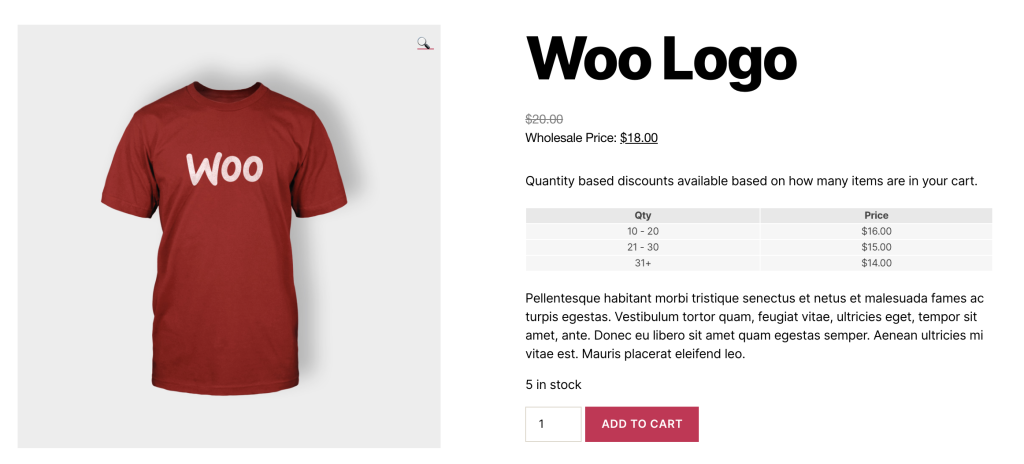
I installed Wholesale Suite to an existing WooCommerce store. The plugin handled wholesale accounts, tiered pricing, minimum orders, and separate checkout flows smoothly.
First, I picked which products worked for bulk orders. Then I set wholesale prices and minimum order quantities. The plugin let me create separate buyer accounts where wholesale customers saw different pricing and checkout experiences than retail shoppers.
This eliminated the need for a second site. Retail and wholesale customers used the same platform but saw different experiences based on their account type. The setup took less than a day to configure properly.
8. Build customer retention with Wishlist marketing
Wishlist data shows interested customers who aren’t ready to buy today. They saved products, which means they’re more likely to convert than random visitors. They just need the right push at the right time.
Wishlist marketing works better than generic emails because you know exactly what each person wants. This is one of the best ecommerce strategies for repeat sales.
How to use Wishlist data for marketing?
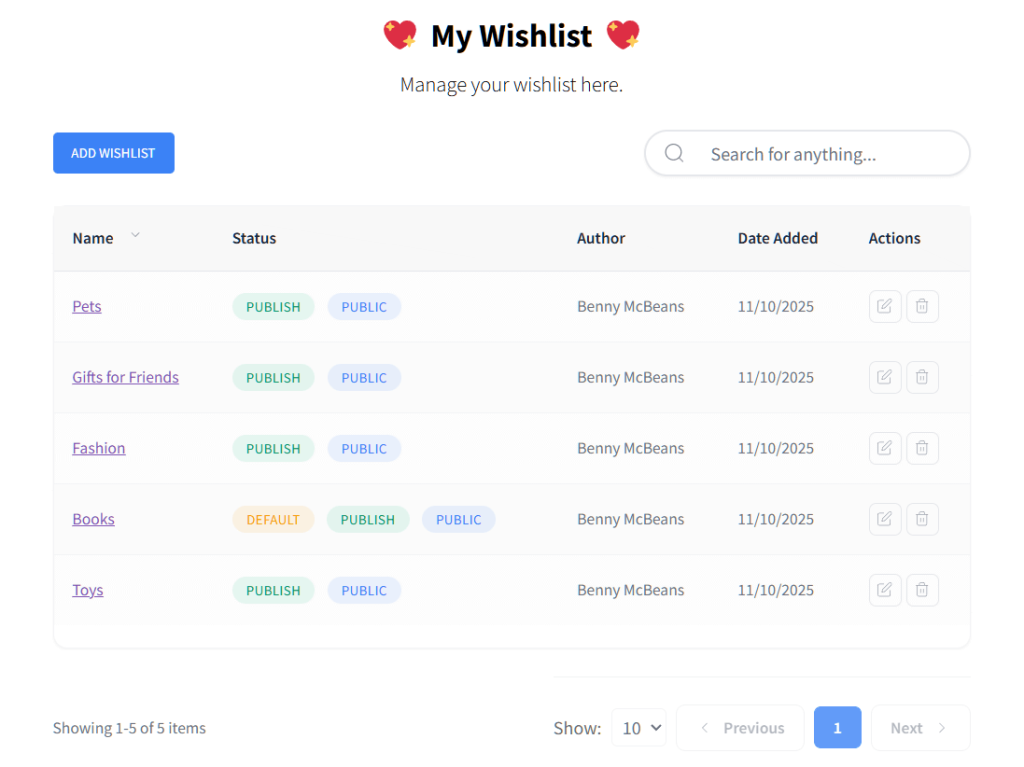
I installed SaveTo Wishlist plugin on a test store. The Wishlist for WooCommerce plugin lets customers create multiple wishlists and name them however they want (like “Holiday Gifts,” “Office Supplies,” or “Summer Collection”). Customers can save products even without creating an account.
The plugin tracks what products customers save to their wishlists. This data shows you what people want but aren’t ready to buy yet. You can then use this information to create targeted follow-up campaigns.
I used Advanced Coupons to send offers based on wishlist activity. For example, “10% off items in your wishlist this weekend only” or special promotions when popular wishlist items go on sale. This approach converted people who were already interested but needed a reason to buy now instead of later.
9. Use analytics and continuous testing
The best ecommerce strategies are built on data, not hunches. You test something new, then measure what happens. Do more of what works. Stop what doesn’t.
Regular data exports show what’s really driving revenue and profit. Analytics and testing tie all your strategies together by revealing what actually works for your specific store. Have you looked at your data this week?
How to track which ecommerce strategies actually work?
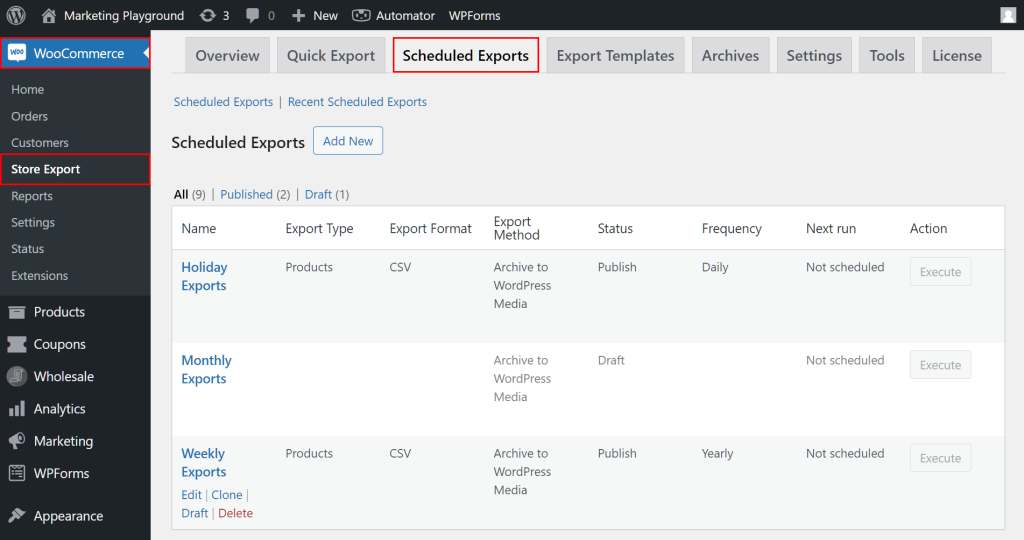
Export your product, order, and customer data regularly. Weekly if you’re testing a lot. Monthly if things are stable.
Check which strategies drive the most revenue and conversions, then put more effort into what works. I used Store Exporter Deluxe as the foundation for tracking.
Regular scheduled exports showed how different strategies performed—SEO changes, promotions, marketplace sales, wholesale orders. When I combined these exports with Google Analytics, I could see full customer journeys. This made it easier to test and learn faster than relying on gut feelings about what might work.
Start Using The Best Ecommerce Strategies Today
The best ecommerce strategies for 2026 focus on foundations that compound over time. Clean data, targeted offers, and meeting customers where they shop deliver better returns than chasing every new trend.
Here’s what we covered:
- Optimize Product Data and Structure
- Run Smarter, Data-Driven Promotions
- Personalize Marketing and Customer Experience
- Improve Pre-Purchase Support
- Expand to Google Shopping and Multi-Channel Feeds
- Scale with Multi-Vendor Marketplace Models
- Add Wholesale as a Growth Channel
- Build Customer Retention with Wishlist Marketing
- Use Analytics and Continuous Testing
Most of these strategies rely on clean product data and the ability to export, analyze, and update your catalog efficiently. WooCommerce users can get started with tools from Visser Labs. Check out our plans and features to find the right tools for your store’s next growth phase.
Frequently Asked Questions
How do I compete with Amazon as a small ecommerce store?
Compete with Amazon by specializing in a specific niche and offering expert product knowledge. Focus on unique products, personalized customer service, and building community around your brand. Small stores win by being specialists, not trying to match Amazon’s selection or speed.
What ecommerce return policy should I offer to reduce friction?
Offer 30-day returns with clear conditions displayed on every product page. Require original packaging and allow exchanges before refunds. Free return shipping increases trust but protect margins by charging restocking fees for opened items or offering store credit instead.
Should I invest in paid ads or SEO for my ecommerce store?
Start with SEO for product pages if your budget is under $1,000 monthly. Paid ads deliver faster results but require consistent spending to maintain traffic. Combine both once you have optimized product content and proven bestsellers worth promoting.
How do I handle slow-moving inventory without hurting my brand?
Bundle slow-moving products with bestsellers instead of deep discounting. Create limited-time bundles, offer them as free gifts with purchase thresholds, or use them for cart-condition promotions. Avoid sitewide clearance sales that train customers to wait for discounts.
Should I sell internationally or focus on one country first?
Focus on one country until you have consistent monthly revenue and smooth operations. International selling adds complexity with customs, taxes, currency conversion, and expensive return shipping. Expand internationally only after domestic success proves your business model works.