

Most online stores pick keywords based on guesses. They chase high-traffic terms without checking if visitors actually buy. Data-driven SEO flips this approach by using your store’s real numbers to guide decisions. If you run a WooCommerce store, you already have the data—you just need to know how to use it.
In this article, we will talk about collecting the right data and turning it into more sales. We will show you how to find the best pages to fix first. You will learn a simple system that works for any store, with real WooCommerce examples.
What Is Data-Driven SEO?
Data-driven SEO is a search optimization approach that uses quantitative metrics from analytics platforms, search performance data, user behavior patterns, and conversion tracking to prioritize SEO tasks based on measurable business outcomes. Instead of making decisions based on assumptions or best practices alone, you use empirical evidence to determine which pages, keywords, and content types deliver the highest return on investment.
Online stores have a big advantage here. You have product data, order history, and customer info that most websites don’t. This lets you tie every SEO choice directly to the money you make.
The key is simple: fix pages that bring in revenue, not just traffic. When you know which products make money, you know which pages matter most. This makes every hour you spend on SEO count.
How To Prioritize SEO Keywords Using Revenue Data
Most stores pick keywords based on search volume alone. They chase terms with 10,000 monthly searches but ignore whether those visitors actually buy. This wastes time on traffic that never converts.
Data-driven SEO changes the game by adding business value to keyword research. You combine search metrics with conversion data to find keywords that drive real revenue. This means prioritizing terms where visitors are already buying, not just browsing.

Here is a simple prioritization framework:
- Find keywords you rank for in positions 4–20 that get clicks but low conversions
- Identify content gaps where competitors rank for high-intent terms but you don’t
- Target keywords with clear commercial intent (product names, “buy,” “best,” comparison terms)
The goal is to focus on keywords where small ranking improvements lead to measurable sales increases. For example, moving from position 8 to position 3 for a high-intent keyword can double your traffic and revenue from that page. A 50/month product might only add $50–100 extra. This is why you prioritize high-revenue products first.
How Ecommerce Sales Data Reveals Hidden SEO Opportunities
Your sales data shows SEO opportunities that keyword tools completely miss. While SEO platforms reveal search volume, they don’t know which products make you the most money or have the best profit margins. This is where your internal ecommerce data becomes a strategic advantage.
Look for three types of opportunities:
- Best-Sellers with Weak SEO: Products that already sell well but don’t rank for their primary keywords need better content and links
- High-Margin Products: Items with strong profit margins deserve dedicated landing pages, even if search volume looks modest
- Seasonal Winners: Products that spike during certain months need content published 2–3 months before peak season
For WooCommerce stores, identify products that generate the most revenue from your sales reports. Check if those high-value pages rank well for their target keywords. If a product makes $5,000/month but ranks on page 3, that’s a huge opportunity. Improving its ranking to page 1 could potentially double or triple that revenue.
Use Store Exporter Deluxe to export order history by month and identify seasonal patterns. If a product consistently spikes every December, create supporting content in September. This gives Google time to rank your pages before shoppers start searching.
Turning WooCommerce Data Into SEO Action Plans
The hard part isn’t getting data—it’s knowing what to do with it. Most SEO tools can’t see your sales numbers. You need to export that info and add it to your plan yourself.
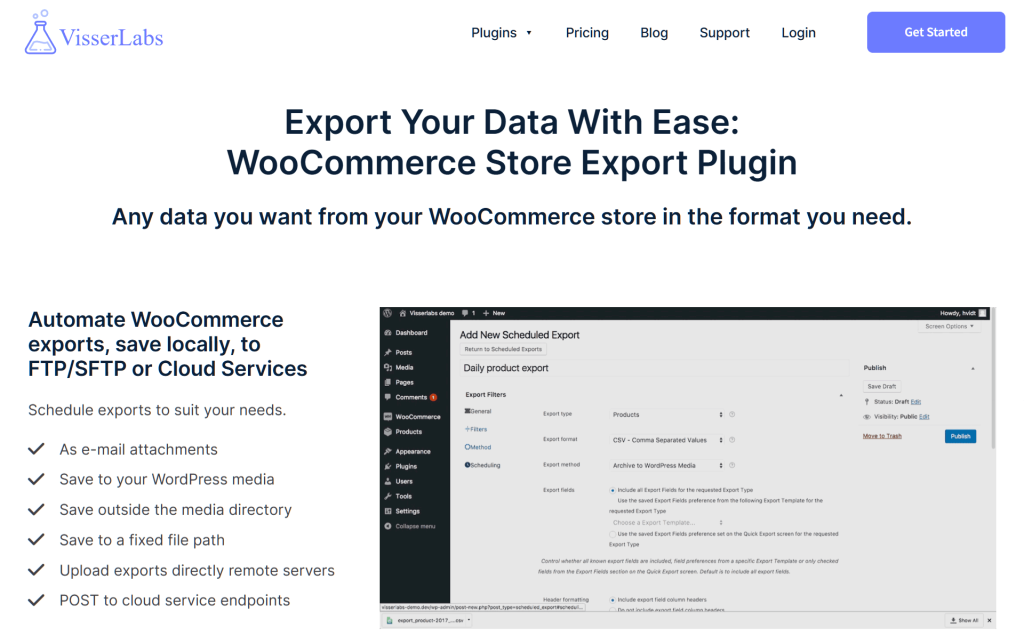
Visser Labs Store Exporter Deluxe is a WooCommerce plugin that lets you export detailed store data into CSV, Excel, or XML formats. It can pull products, orders, categories, tags, customers, and custom fields with advanced filtering options. You can schedule automated exports or run them manually whenever you need insights.
1. Export product performance data
Pull revenue by SKU, units sold, profit margins, and conversion rates to identify which product pages deliver the highest business value. This allows you to prioritize SEO efforts on pages that generate the most revenue rather than pages with the highest traffic.
2. Audit site taxonomy and structure
Export categories, tags, product attributes, and navigation hierarchies to evaluate whether your site architecture aligns with actual customer search behavior. This reveals structural SEO issues such as misaligned category names, missing taxonomy terms, or navigation paths that do not match search intent patterns.
3. Identify content gap opportunities
Export historical order data to discover high-performing products that lack supporting content such as buying guides, comparison articles, or how-to tutorials. Products with strong sales but minimal content represent immediate opportunities to capture informational search traffic that leads to conversions.
Practical Workflow for Data-Driven SEO with WooCommerce
- Export product performance data from Store Exporter Deluxe
- Analyze the export in a spreadsheet to identify high-revenue products
- Cross-reference these products with Google Search Console to find ranking gaps
- Build a prioritized task list focusing on high-value, low-ranking pages
- Optimize those pages first to maximize revenue impact per optimization hour
The workflow is simple: Export your data, analyze it in a spreadsheet, compare with Search Console to find ranking gaps, then build a prioritized SEO task list. For instance, if your export shows a high-margin product with weak rankings, you know exactly which page to optimize next.
Bonus Tip: Set up scheduled exports to automatically pull fresh data every week or month. This keeps your SEO insights current without manual work. For example, schedule a mo with Search Console, then make a task list. For example, if a high-profit product ranks poorly, fix that page next.
How To Measure Data-Driven SEO Success with Analytics Dashboards
Data-driven SEO never stops. After you make changes, you need to check if they worked. Track metrics that connect to real money, not just visitor counts. A good dashboard shows which SEO work actually brings in sales.

Track these four things to measure SEO results:
- Traffic by category: Watch visits to each product type. If “Winter Jackets” traffic jumps 150% after you optimize the page, you know it worked.
- Sales from search: Measure actual money from search traffic using Google Analytics. More visits mean nothing if they don’t buy.
- Rankings for best products: Track where your top-selling products rank. Moving from spot 8 to spot 3 can double your sales.
- Conversion rate changes: Compare sales rates before and after you fix a page. A jump from 2% to 3% means 50% more sales.
Simple dashboard for WooCommerce
Mix Google Analytics with monthly exports from Store Exporter Deluxe. This shows which pages made more money after you improved them. For example, fix five pages in March, then check if those products sold more in April.
Check your dashboard monthly to see big trends. Check weekly to catch sudden drops that need quick fixes. This keeps you on top of both long-term wins and short-term problems.f your export shows a high-margin product with weak rankings, you know exactly which page to optimize next.
Conclusion
Data-driven SEO turns your store’s numbers into an edge over rivals. Instead of guessing which pages to fix, you use proof to guide choices. This puts your effort on work that brings real money, not just more visitors.
Throughout this article, we covered:
- How To Prioritize SEO Keywords Using Revenue Data
- How Ecommerce Sales Data Reveals Hidden SEO Opportunities
- Turning WooCommerce Data Into SEO Action Plans
- How To Measure Data-Driven SEO Success with Analytics Dashboards
Ready to turn your WooCommerce data into search traffic? Use Store Exporter Deluxe to pull product and sales info, then add it to your SEO plan. This method makes sure every hour you spend brings results you can measure.
Frequently Asked Questions
How long does it take to see SEO results from data-driven optimization?
Most ecommerce sites see measurable ranking improvements within 8–12 weeks after implementing data-driven SEO changes. Revenue impact typically appears 12–16 weeks after rankings stabilize, depending on product category competitiveness and seasonal demand patterns. Low-competition long-tail keywords can rank in 4–6 weeks, while competitive category pages may take 16–24 weeks. Track weekly ranking changes in Google Search Console and month-over-month revenue in GA4 to identify early wins.
How do I do data-driven SEO with no budget?
Use free tools: Google Search Console for keyword data, Google Analytics 4 for revenue tracking, and Google’s Mobile-Friendly Test for technical issues. Export your WooCommerce product data to a CSV to analyze which categories have the most products versus traffic.
Start with the highest-impact fixes: optimize your 10 best-selling product pages first, fix broken internal links, and improve mobile page speed. Spend 2–3 hours weekly instead of hiring an agency. Use WordPress plugins for basic technical SEO.
My products are the same as competitors. How do I rank higher?
Add unique value to product pages: customer photos, detailed sizing guides, comparison charts, video demos, or expert recommendations. Google ranks pages with helpful, unique content—not just product specs copied from manufacturers.
Focus on differentiation beyond the product itself: faster shipping, better return policies, bundle deals, or niche expertise. Highlight these in your content. Get customer reviews and display them prominently—pages with 50+ reviews rank better than identical pages with zero reviews.
How do I know which pages to optimize first?
Prioritize pages with existing rankings between positions 5–15 in Google Search Console. These are easiest to push to page one. Filter by impressions over 100 per month and click-through rate below 5%. These pages already have visibility but need optimization.
Second priority: your highest-revenue product and category pages, even if they don’t rank yet. Export sales data from WooCommerce and cross-reference with Search Console to find revenue-generating pages with low rankings. Fix these before optimizing low-value pages.