When a customer saves a product on your WooCommerce store, what happens next? For most store owners, the answer is nothing. Those wishlists become forgotten digital shelves. Here’s the thing I’ve learned after working with hundreds of stores: that saved item isn’t just a bookmark. It’s a customer telling you exactly what they want. They’re just not ready to buy yet. That’s exactly why SaveTo Wishlist Pro exists.
It turns those “not ready yet” moments into automated follow-ups, price-drop alerts, and sales you would have otherwise missed. A wishlist shouldn’t be a dead end. It should be the bridge between interest and checkout.
In this guide, I’ll show you how SaveTo Wishlist Pro helps you spot trends before they peak, recover lost revenue with smart automations, and turn passive browsers into repeat buyers. Plus, I’ll share how pairing it with Visser Labs gives you a complete picture of your customer behavior.
Table of Contents
Why Upgrade To SaveTo Wishlist Pro?
Here’s something I’ve noticed: purchase data tells you what already happened. Wishlist data tells you what could happen. When someone saves an item, they’re saying, “I’m interested, just not ready yet.” That’s intent you can actually act on.
A basic wishlist plugin gives shoppers somewhere to stash items. That’s fine, but it’s passive. SaveTo Wishlist Lite handles the essentials like multiple lists, guest access, custom styling, and account pages.
Those features help shoppers. But SaveTo Wishlist Pro helps you build a bigger business. It tracks how people interact with your store and gives you tools to turn those interactions into sales. You see which products are heating up, and the system sends price-drop alerts automatically.
What I appreciate about SaveTo Wishlist Pro is that it never sleeps. You’re not stuck manually following up with every customer who saves an item. The software handles all of that in the background.
Core Features That Make SaveTo Wishlist Pro Powerful
Upgrading from a basic tool to the pro version opens up possibilities you might not have considered. I’ve tested every feature myself, and honestly, they transform how you think about wishlist data.
1. Advanced Analytics: See what customers are really watching
You can’t improve what you don’t measure. Advanced analytics remove the guesswork by showing exactly which products catch people’s attention, even before anyone buys.
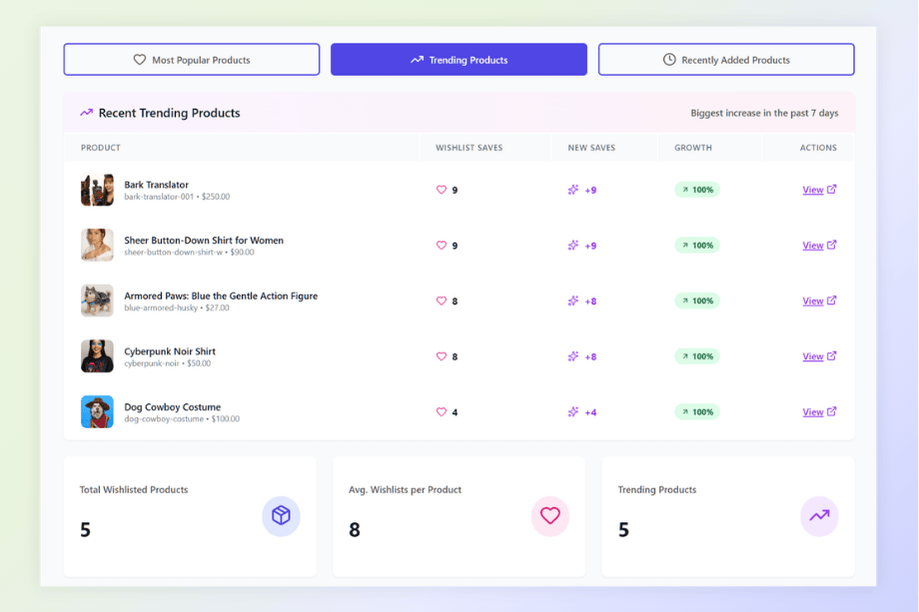
SaveTo Wishlist Pro’s analytics give you:
- Product insights: See trending items this week or month. Know what’s hot before inventory runs out.
- Category and brand insights: Discover which parts of your store are winning. If one brand gets saved more than others, that’s your cue to stock deeper.
- Engagement tracking: See how often items get added, moved, or removed. Lots of movement usually means lots of interest.
- Time-based trends: Spot seasonal patterns early so you’re ready for holidays before the rush.
- Customer behavior: Group shoppers by what they save. Use this to personalize emails or retargeting campaigns.
My suggestion? Check your trending products report weekly. When an item trends, people want it but may wait for a better price. Run a small, limited sale on that specific product. That little nudge often moves items from wishlist to cart.
2. Automations: Let your wishlist work while you sleep
Running a store means juggling a hundred small tasks. SaveTo Wishlist Pro’s automations handle the repetitive ones so you focus on bigger priorities. Connect automations to wishlist activity, and you’ve got a system that works 24/7.
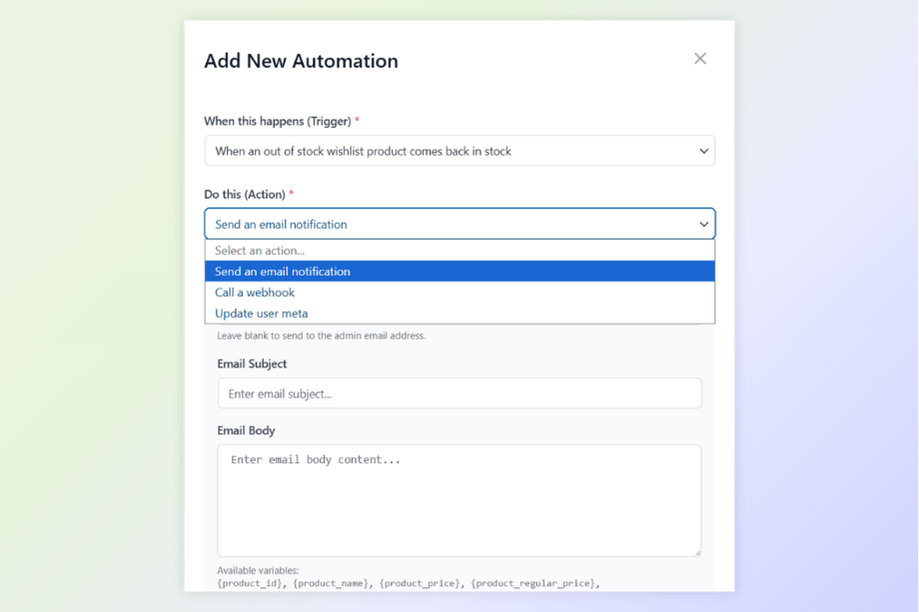
Here’s what automations include:
- Smart triggers: The system reacts instantly when someone creates a wishlist, adds an item, or when a saved product goes on sale.
- Automatic actions: You decide what happens next. Send an email, tag the customer, or notify your team.
- Customer tags: Automatically add notes to customer profiles based on saved items. Perfect for segmentation later.
- Advanced workflow management: Build custom rules with conditions. No one-size-fits-all limitations.
- App connections: Use webhooks to send data to your email list, CRM, or analytics tools instantly.
What I love about this: you can set up a “price drop alert” automation in minutes. Once it’s running, you forget about it. The moment a saved item goes on sale, the customer gets an email. Testing this for the first time felt almost too easy.
3. Webhooks: Connect wishlist data to everything else
Moving data between different apps can drive you crazy if they don’t talk to each other. Webhooks fix that. They act as a universal messenger, taking wishlist events and sending them instantly to any app that can receive data.
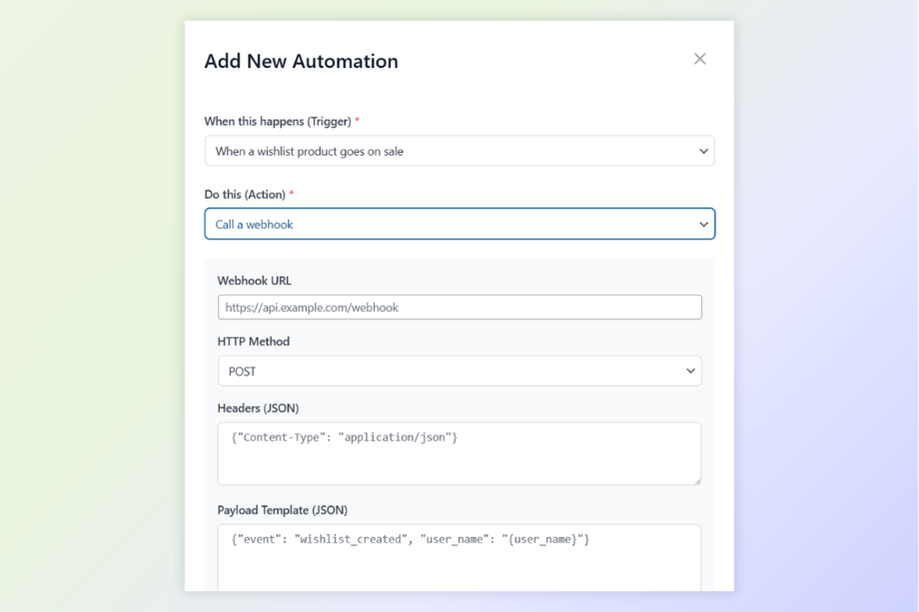
With SaveTo Wishlist Pro’s webhooks, you control:
- Event triggers: Send data the moment a wishlist gets created, updated, or shared.
- Custom endpoints: Choose exactly where data goes. It could be a spreadsheet, CRM, or automation tool like Zapier or Make.
- JSON payloads: Information arrives in a clean, modern format other apps understand.
- Real-time delivery: No waiting. Data moves as soon as the action happens.
This keeps all your business platforms in sync. Stream wishlist data to marketing tools like Mailchimp or Klaviyo, automation hubs, or custom dashboards. Once connected, your records stay updated everywhere without manual entry.
4. Wishlist Sharing & Permissions: Turn customers into marketers
Shopping gets more social when people can share. Wishlist sharing transforms a private list into a way for customers to promote your products for you.
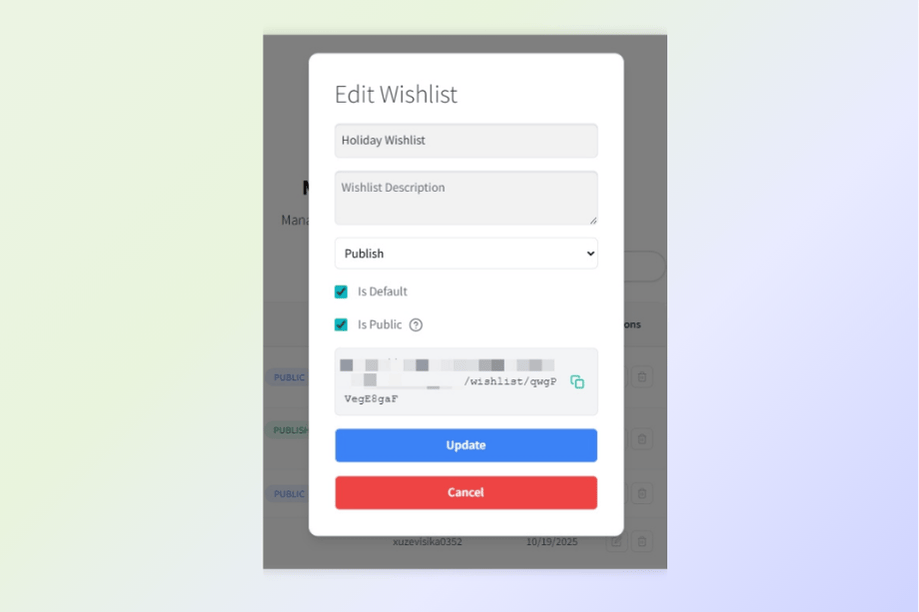
Here’s how SaveTo Wishlist Pro handles sharing:
- Advanced sharing: Customers send lists via email or create private links with unique codes.
- Permission control: Let customers decide who can view versus edit a shared list.
- Public wishlist directory: Enable a space where shoppers browse public lists. Optional, but great for product discovery.
- Custom email styles: Match sharing emails to your brand’s look.
- Activity tracking: See when shared lists get opened. This tells you how often products get passed along.
These sharing tools turn wishlists into referral engines. When shoppers share with friends, they market your store for free.
How To Upgrade To SaveTo Wishlist Pro
Already using SaveTo Wishlist Lite? Moving to Pro is straightforward:
- Get the Pro plugin from the SaveTo Wishlist Pro page
- Install and activate while keeping Lite active
- Enter your license key under SaveTo Wishlist > License
- Let it update itself. Pro handles updates automatically
Once activated, analytics, automations, webhooks, and sharing features appear instantly. No complex setup needed. I tested the upgrade myself and was done in under five minutes.
How Visser Labs Complements SaveTo Wishlist Pro
SaveTo Wishlist Pro gives you insight into what customers want. But to run a healthy business, you also need to know what they actually do. That’s where Visser Labs fits in.
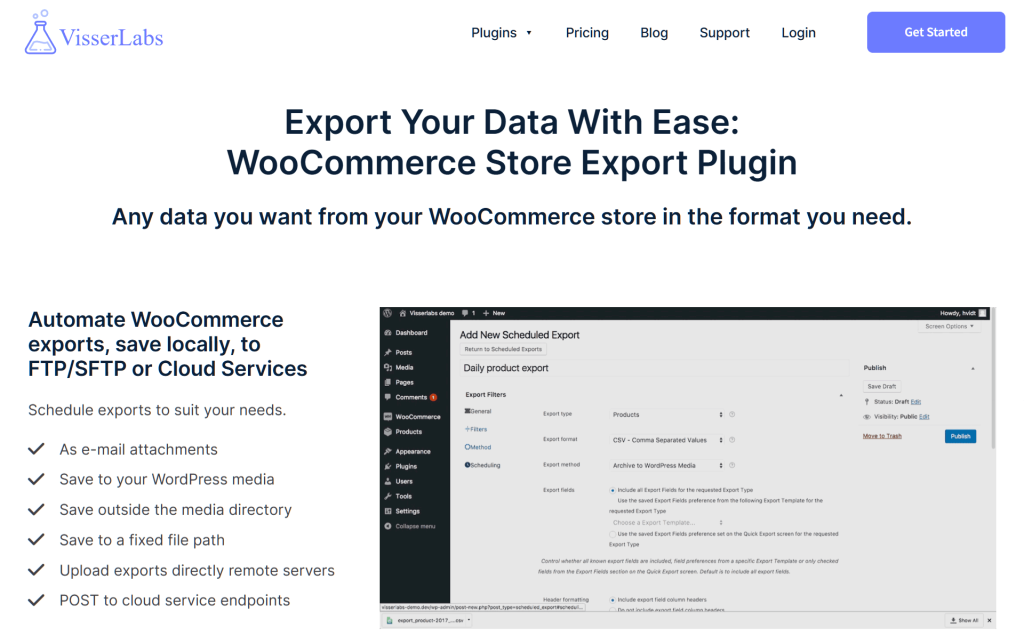
Visser Labs’s Store Exporter Deluxe that pull your store data into formats you can actually use. Orders, products, customers, coupons. Think of it as your bridge between customer intent and business operations.
Here’s why I like this combo: SaveTo Wishlist Pro shows you rising interest. Visser Labs shows you what happened next. Did those interested customers eventually buy? Which products actually converted? Who are your best customers?
Practical ways to use them together:
- Compare SaveTo Wishlist Pro trending items against Visser Labs sales reports. See what people save versus what they buy.
- Export customer purchase history with Visser Labs, then cross-reference against wishlist behavior.
- Automate monthly order reports to your accountant while SaveTo Wishlist Pro handles marketing follow-ups.
I saw a store do this recently. They noticed a category trending in SaveTo Wishlist Pro, exported sales data with Visser Labs to confirm demand, and stocked deeper. Within weeks, that category became their top performer.
The point? One tool shows you intent. The other shows you impact. Use both to run a smarter store.
Conclusion
Wishlists are genuinely one of the most underutilized tools in ecommerce. Most store owners install a plugin and never look at the data. But when you use SaveTo Wishlist Pro intentionally, those saved items become your clearest window into customer intent. You stop guessing and start acting on real information.
Here’s what we covered:
- Why upgrade to SaveTo Wishlist Pro
- SaveTo Wishlist Pro’s advanced analytics
- Automations that run on autopilot
- Webhooks connecting wishlist data to other apps
- Wishlist sharing and permissions
- Using Visser Labs to export and act on wishlist data
If you’re tired of watching wishlist items gather dust, give SaveTo Wishlist Pro a try. And if you want to put that data to work across your entire business, Visser Labs is the perfect companion. My advice? Use them together. They’re even better as a team.